Top Improvements to SOLIDWORKS Browser-Based Roles

BLOG

Top Improvements to SOLIDWORKS Browser-Based Roles

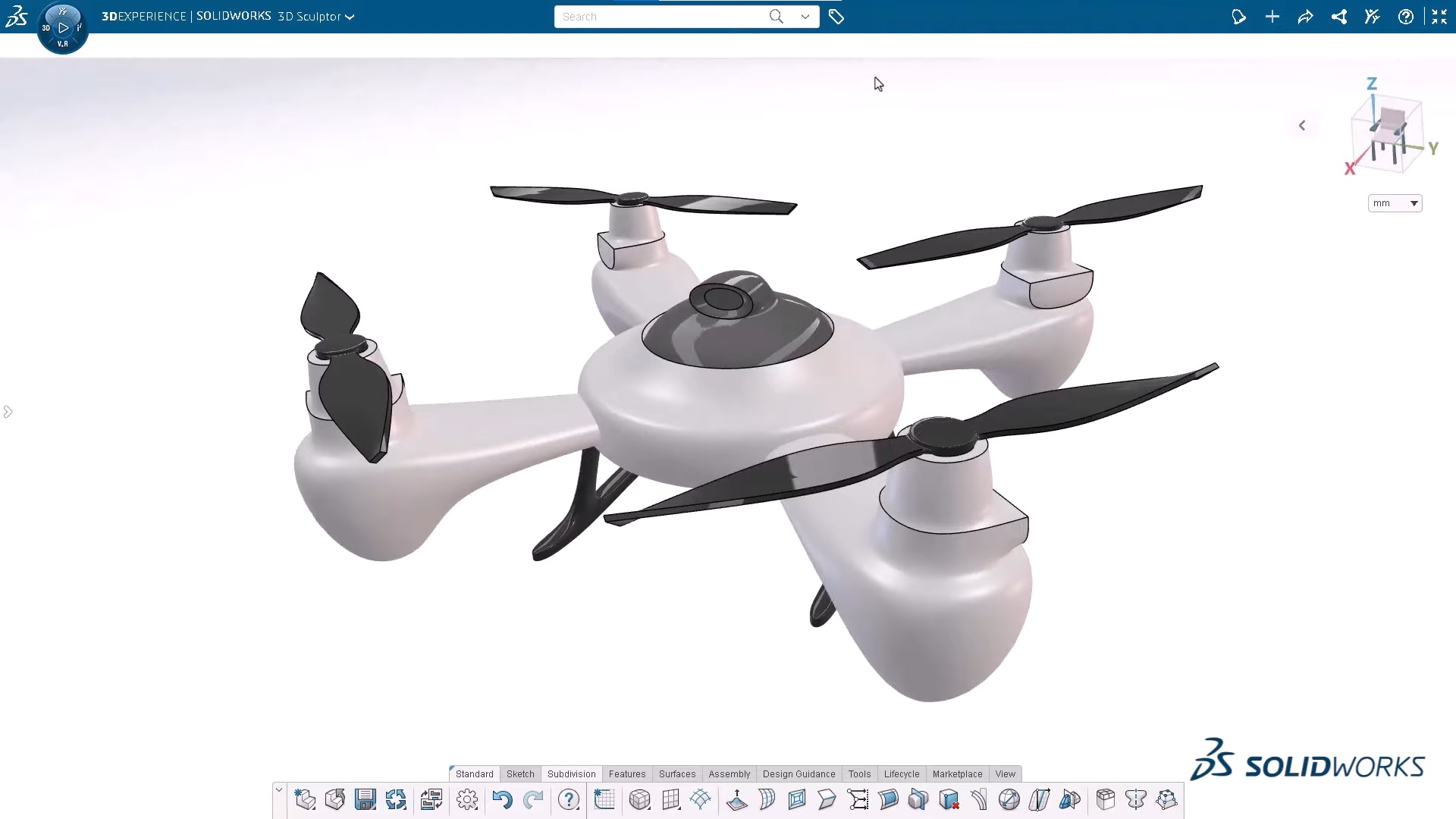
At the forefront of CAD innovation and engineering design quality of life, the 3DEXPERIENCE platform is constantly looking for ways to improve how the world’s engineers and product designers work. From improving their options for browser-based 3D modeling to adding new, more accessible tools and collaboration opportunities, the 3DEXPERIENCE platform adds new features as often as the world starts a new design! In this blog, we’ll discuss some of the most recent upgrades, improvements, and additions to the browser-based roles on the 3DEXPERIENCE platform to see how both designers and non-CAD users, worldwide, can benefit and enjoy a more accessible, more fluid daily design and product development routine. 


Without further ado, let’s dive into the R2023x FD02 release. 


1 . User Experience Quality-of-Life Upgrades 


New Default Dashboard – Now, you can access all your roles in one convenient location – the SOLIDWORKS Creator Home dashboard. This dashboard is designed to help keep you organized and reduce screen clutter, allowing you to quickly access your 3DEXPERIENCE roles. 


  • Get easy access to all your roles in one place. 


System Status Menu – Enhance system performance and accurately track issues with the new System Status menu. This menu allows you to easily check the status of your network and server connections, so you can quickly identify any underlying problems that may be impacting performance. 


  • Ensure a smooth connection and a successful design experience before you start any project. 


Design in the Context of HomeByMe in 3D Creator – You can now take advantage of 3D Creator’s parametric capabilities and test for fit, function, and aesthetics when bringing your HomeByMe designs into the environment. HomeByMe, a free home design and furnishings solution by Dassault Systèmes, allows you to measure, reference, and mate to geometry in one place, ensuring your design fits your specifications. Easily share your 3D Creator models back to the HomeByMe community. 


  • Design in a more realistic, life-like setting, and take advantage of parametric capabilities. 


Selective Save – With the Selective Save feature, you can improve your collaborative workflow by saving parts of an assembly without interruption. You can quickly identify which components are locked, deselect them, and save only the components that you are currently working on. This eliminates the need to ask someone to unlock a file.  


  • Work more efficiently and without interruption. 


Lock Status and Unlock Requests – With the latest tools, you can quickly and easily identify which elements are locked and by whom, and then instantly send unlock requests directly to the right people in real-time. No more waiting for someone to unlock a file.  


  • Collaborate seamlessly, knowing exactly which components are blocked and who to contact for immediate access. 


Sketch Pattern – The Sketch Pattern command now offers increased control and flexibility when creating patterns with the new Skip Instance checkbox. This is a helpful tool when you don’t want certain instances of the pattern to be created in overlapping or whole areas. With the Skip Instance feature, you can quickly add or remove instances from your pattern without disrupting the overall pattern. 


  • It’s now much easier to create the exact pattern you need for your design. 


Hide/Show Options in Measured Command – The Measure command now offers added control and time-saving features with the Hide/Show Options. These options allow you to quickly capture measurements related to internal and hidden components that are located behind other geometry, so you don’t have to leave the Measure command to get the measurements you need. 


  • With the Hide/Show Options, you can save time and have more control over your measurements. 


Volumetric Section View – By using Volumetric Section View, you can create a bounding box to divide your design into sections, allowing you to view the internal components without being distracted by additional elements. With this view, you can focus solely on the task at hand, giving you the ability to gain a better understanding of your design. 


  • Easily cut through the clutter and gain clarity in your designs. 


2 . Manufacturing Definitions 


Section Views – With a new 3D view type, you can easily create professional representations of internal features and dimensions for downstream communication. This makes it easier to define manufacturing information for internal component geometry. 


  • Capture design intent and internal details of complex components more clearly. 


Bent Leader Option – You can now customize how you display your drawings with the new bent leader option in Manufacturing Definition Creator. This feature allows you to create annotations with bent leaders that meet ASME and ISO standards for radius and diameter dimensions, giving you more control over the look of your drawings. 


  • Be confident that all your drawings are compliant with industry requirements. 


STEP A242 Export – You can now use 3DPlay to share, view, and mark up STEP A242 files for downstream communication and manufacturing. This format provides the industry-supported model-based definition (MBD) workflows. 


  • Export 3D annotations more efficiently. 


3 . Freeform Design 


Align Vertices Command – The Align Vertices command has been updated. Now, when using shift-select, the first two entities you select will define the alignment axis for all the remaining points. 


  • Specify vertices for alignment more easily. 


Bend and Flex Tool – When using the Flex tool, the robot manipulator and range manipulator are now offset from one another, making them easier to use. Additionally, the Bend tool now offers a Limit Bend option that allows you to ensure the deformation of a specific design region without bending the region beyond the manipulator. With this new option, you can easily control the exact shape and form of your design. 


  • Make your design intent clearer and gain increased control. 


Improved Copy/Paste – With improved Copy and Paste, placing a copied instance of a subdivision (Sub-D) body is easier than ever. When you Copy and Paste, a preview of the new instance appears in yellow, allowing you to accurately locate it in the desired position. You also have the option to scale and flip the instance. 


  • Create complex Sub-D geometry faster and more easily. 


Reflect Command – Creating a mirrored instance of an existing subdivision body is now even easier. Simply duplicate the existing body and use the mirror tool to flip the object along the desired axis. This will create a mirrored instance of the original body which can be modified independently of the original. 


  • Easily create a mirrored instance of a subdivision body. 


Crease Command – Save time with the new and improved Crease Command! When you apply a crease, the affected entities will remain selected, allowing for further modifications without having to reselect them. 


  • Save clicks and streamline crease creation. 


4 . Sheet Metal Design 


Enhanced Workflows and Mini Dialogs for Custom Walls – The Wall on Edge feature includes enhanced workflows and mini-dialogs that provide quick access to the sketch option and help to streamline the creation of custom walls and flanges. The workflow is shorter than before and the mini-dialogs are user-friendly, making it easier to use on smaller devices such as mobile phones and tablets. 


  • Create custom non-rectangular walls and flanges quickly and easily with the new Wall on Edge feature. 


5 . Structure Design 


Machine Learning for End Cap and Plate Placement – With the Design Assistant Selection capabilities, you will get suggestions for multiple end cap or plate placements. Simply click on one of the endcaps and the Design Assistant will automatically populate a suggestion for the other endcaps or plates and propagate them for you. 


  • Reduce time spent on manual work by quickly placing multiple end caps or plates. 


Find out more: 

Whether it’s communicating with colleagues or outside stakeholders, trying to add tools to a design more efficiently, encouraging experimentation with easy-to-use features, or just making your everyday designing more enjoyable, the 3DEXPEREINCE platform’s browser-based roles seek to make your daily design routines easier and more fluid, so you can focus on innovation. 


Watch this 3DEXPERIENCE presented video to see these enhancements in action:https://www.youtube.com/watch?v=JdBwc4Obc9Q


For more information or to request a 3DEXPEREINCE platform demo, contact the Xperts today!

X_green_halo

Any questions? Need help? Ask one of our experts.

Whether you’re ready to get started or just have a few more questions, you can contact us toll-free:

    3DEXPERIENCE SOLIDWORKS 2023 WHAT’S NEW

    BLOG

    3DEXPERIENCE SOLIDWORKS 2023 WHAT’S NEW

    ASSEMBLIES

    Optimization of lightweight / resolved :

    Lightweight supports part mass and similar properties.

    Auto repair of mate references

    Improved assembly cut feature

    Highlighting for overwritten BOM cells

    Specify the default BOM part number (as either Document or Configuration name)

    Improved STEP export

    Preview of Replace Component with instance(s) to replace controls

    Color option for Explode Lines

    Specify affected configuration(s) for skipped instances in patterns.

    Ability to suppress magnet mates & related connection points

    Override computed mass or cg values with Design Table entries

    Assembly feature propagation blocked from affecting Toolbox parts

    Assembly patterns with skipped instances are easier to configure.

    Replace component improvement, better options for instances, and more.


    COMPOSER

    View Collections capability

    Updated import file format support

    Support of Pro/E, CREO & STEP meta properties


    DRAWINGS

    Component Name display choices made in part or assembly feature tree are reflected in the Drawing view pallet.

    Detached Drawings are fully discontinued and replaced with Detailing Mode

    Detail drawings of assembly components can be opened directly from the assembly drawing without opening respective geometry files.

    RMB graphics area, BOM cell, or drawing view tree.

    Not fully supported for Detailing Mode.

    BOM table overrides can now have a specific highlight color. (default Sys Opt is black)

    RMB selection is provided to restore to original values per cell, row, column, or the entire table.

    Highlight color only shows when the table is selected. (not for print and so on)

    Quantity indicators now allowed for Auto Balloons as well as manual balloons.

    BOM tables can now be filtered like a spreadsheet, and the auto balloons update to match.

    Do not combine filtering with the hiding of columns or rows.

    Transparent component support for HLR / HLV views improved to match with ISO standard 128-2020.

    Check box option in view PM or in Document Properties.

    Hole Tables now support punches and slots in addition to holes (a top 10 ER).

    GeoTol symbols can be limited to the current drawing standard.

    Vector translation modifier now supported in GeoTol frames.

    Dynamic Profile Tolerance supported per ASME Y14.5-2018


    EDRAWINGS

    Assembly display and publish improvement

    Model Configuration support for eDrawings mobile apps

    Publish support for Display States in eDrawings

    Display Style improvements

    File type version enhancement

    Multi-language support for eDrawings to web HTML

    Inch fractional measurement units


    ELECTRICAL

    Support for hybrid drawings – schematics & tables combined on 1 sheet

    Component dynamic connection label annotations supported in schematics

    Ability to set 3D part mass props from Electrical Schematic properties (per spec sheet)

    Improved condition icons for 3D electrical components (inserted, connected, and so on)

    Open ended wire support in schematic. (for pigtails or wire on install connections)

    Schematic sheets support more image types. (tiff, png, jpg)

    Deleting Component can force deletion of related symbols

    Reset for Dismissed Messages

    Excel Automation Improvement

    Origin -> Destination specification


    FLOW

    Mesh Boolean Operation – allows meshes to create even when base geometry is imperfect

    Turbidity Factor – for solar radiation effects, accounts for polluted or storm-filled atmosphere

    Reduces heat effects in some cities versus open desert

    Plot Cropping – (cut, mesh, surface) restrict the display to a particular material or fluid domain

    Tangential & Radial Velocity effects for Fan Curves – property allows a more thorough definition of fan performance

    Heat conductance on porous media as dependent on specific mass flow – increases accuracy for compressible fluid and gas flows.

    Project Tree Sorting – alphabetically or chronologically

    Transient Explorer export options – export results by time range, or for the active time moment

    Transient Explorer custom parameters – for better visualization

    New Study Goals –

    Total Energy Balance

    Volumetric Heat Generation Rate

    Radial & Axial Velocities

    Flux Plots with total energy balance display

    Performance – Mesher and Solver operations are now faster due to improved memory use management


    IMPORT/EXPORT

    Large assembly export supports individual STEP file generation

    Textured *.obj file import is improved


    INSPECTION

    AddIn – Balloon Sequence configurability

    With multi-sheet options

    Addin – Balloon Drawing Sheets Separately

    Addin – Export sheets as separate PDF files

    Addin – Export reports as separate Excel files

    Addin – Inspection Manager with Characteristic tree view

    Standalone – Autoballoons for PDF drawings

    Standalone – Manual Extract replacement for OCR (better results)

    Machine Learning support for 2D PDF

    Sheet selection mode for multi-sheet drawings

    Export Reports to individual Excel files

    Balloon Sequencing


    INSTALLATION & SNL

    Flow Simulation HVAC and Electronics Cooling modules can now be independent AddIns and the SNL licenses loaded or unloaded as needed rather than always being reserved with each use of Flow Simulation.

    Term licenses now show pending expiration in the SNL manager and can be renewed or reactivated by individual serial numbers.

    All products will now have a term license option.


    MANAGE

    Automatic update of mapped linked records

    New From option for data fields

    BOM field comparison (linked vs primary)

    Variable Driven BOM Qty support

    Cancelled Tasks reflect properly in capacity planning

    Task Board Display


    MBD

    View control for all dimension types, not just DimXpert annotations

    Hole Tables support multiple views

    Dimension Extension Line

    Datum Feature editing

    Wedge as geometric & annotation feature

    Support for ISO Tolerance modifiers


    PART MODELING

    Support of Move/Copy Body translation or rotation values in Equations and Design Tables

    Defeature now supports creating derived configurations for parts as well as assemblies.

    Dimension support in Move/Copy Body

    Allowance of Library Feature Errors – click [Yes] to accept the feature errors, and then correct them after the insertion in the current part.

    Coordinate Systems are now valid for selection in more commands – such as, 3D sketch operations, 2D sketch dimensions, mirror, and during select other

    Single stroke font support in Wrap Feature sketches (Scribe wrap type)

    OLFSimpleSans – is installed by SOLIDWORKS

    Hybrid Mesh-BREP modeling improvements

    Extended feature support

    Section View creation through Axis

    Euler method rotation is now allowed for Move/Copy Body, and it can be set per configuration.

    Move/Copy Body translations can also be set per part configuration now.

    Global variables or equations can now be used to drive the Move/Copy Body values.


    PDM

    HTML customization for Notification templates

    File Version Upgrade Tool – supports overwriting latest version

    Streamlined UI for check-in/out

    New options to manage Deleted Users

    Transition Actions configurable by user account and properties thereof

    Tooltips can be added to Data Card fields

    Improved Data Card controls

    Copy & Paste display text to variable fields

    Buttons can have user-lookup data (names, AD fields, and so on)

    Better image file support. (jpg, png)

    Logging of File Retrieval Operations ([x]Get log property at PDM Pro server)

    Display source Groups for Inherited User Permissions

    All data transfers encrypted to/from the server

    STEP export task enhanced for 242, or shattered assembly components.

    eDrawing files in the vault support thumbnail previews in the explorer panel.

    Autologin option for vault Admin. (setting in the admin tool at a local machine)

    Archive Server & Database Server improved in higher latency environments (Azure, AWS)

    Private State folder visibility option for non-Admin users.


    PERFORMANCE

    Level of Detail system option to improve graphics changes (zoom, pan, rotate) for most view types.

    Faster save operations for large assemblies with some amount of unchanged components.

    PDM is faster and more efficient in high-latency networks.

    PDM file version upgrade tool operates faster.


    PLASTICS

    Material Database & Material Grade additions

    Material Database UI improvement

    Report enhancements


    ROUTING

    Improved electrical flattening and manufacturing drawings

    With better connector tables.

    Multi-wire circuit splice support.

    Design Library auto-style clips added.

    Routing Library Manager performance and usability improvements.

    Harness diameter & length are show in an electrical route property manager.

    Accommodates and displays unused cores.

    Auto Route improvement for discrete wires


    SHEET METAL

    Deviation sensor

    You can create a sensor to alert that the sheet metal exceeds a bounding box size. (max length, width, area, blank area)

    Symmetrical Thickness

    Specifies material to be applied symmetrically from the base flange sketch.

    Gauge Values in Cut List properties (and drawing notes)


    SIMULATION

    Improved surface to surface bonding interactions (allowed for non-contacting faces)

    For ignoring set screws, pins, etc.

    Diagnostic Tools

    Linkage Rod Connector

    Penalty Stiffness Control for Contact (up to 50% solve)

    Solver improvements

    Underconstrained Body management (Simulation Professional & Premium)


    SKETCHING

    Elipses now have options to create construction lines across the axes.


    SOLIDWORKS CAM

    Barrel Tool Support

    Improved Leadin & Leadout Calcuation for contour milling

    Lines Only Option for VoluMill Toolpath

    Tolerance Based Machining improvements


    STABILITY

    90% reduction in customer reported crash SPRs.STRUCTURE SYSTEMS

    Corner Trims of similar corners by Group, with Connection Plates by Group

    Configuration specific weldment member sizes

    Alignment of Custom Properties Attributes (for matching with 3DEXPERIENCE attribute types)


    USER INTERFACE

    Comments in SOLIDWORKS files now have additional color and formatting options.

    Comments can be set to Show At Start when files are opened.

    Improved Restore Default Settings options and behavior.

    Improved behavior of Copy Options Wizard.


    VISUALIZE

    Color Picker tool improvements

    DSPBR Materials Support

    Import Options (grouping) are easier for SOLIDWORKS files

    Stellar Physically Correct illumination render

    PhotoView 360 to be retired at 2023 sp5.

    X_green_halo

    Any questions? Need help? Ask one of our experts.

    Whether you’re ready to get started or just have a few more questions, you can contact us toll-free:
      How 3DExperience will help you use SOLIDWORKS  

      BLOG

      How 3DExperience will help you use SOLIDWORKS

      By Steven Murphy – Elite Applications Engineer

      While the 3DExperience platform takes the CAD industry by storm, what does it mean for the average SOLIDWORKS user? Despite the industry trend toward SAAS (Software as a service), SOLIDWORKS will remain available as a perpetual license. The only change for conventional SOLIDWORKS users is access to a wider variety of tools using the 3DExperience platform to augment your current workflows. Knowing what tools you have access to on the cloud will give you a competitive edge and the tools you need to stay successful.


      Top Tools to Leverage 3DExperience Using SOLIDWORKS


      ENOVIAWORKS (PLM)

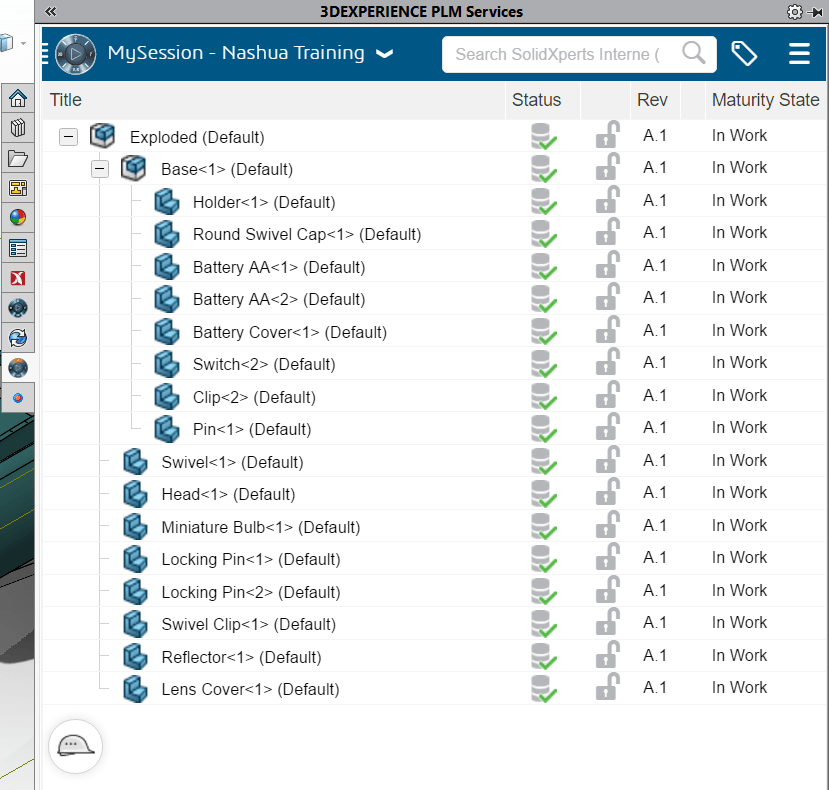
      Everyone is familiar with “the cloud,” or the idea of connecting via internet to servers remotely in order to gain flexibility and save on hardware costs. With the integration of ENOVIAWORKS into the 3DExperience platform, cloud PLM [Product Lifecycle Management] services are readily available to use with SOLIDWORKS files. This includes a complete product data management (PDM) system as well as tools to manage the processes surrounding the part’s fabrication.

      For the average SOLIDWORKS user, this means access to revision controlled files from anywhere you can use SOLIDWORKS. Just login to the PLM services pain integrated with SOLIDWORKS and you are off to the races. You can also drag and drop files from the 3DExperience platform into SOLIDWORKS to open and start working. On top of this functionality, the files in PLM can be referenced in chats, integrated into blog posts, and worked with in the 3DExperience “X Apps.” These X Apps provide a range of versatility for part creation without ever leaving the cloud.


      3DEXPERIENCE PLM SERVICES SOLIDWORKS View


      XShape

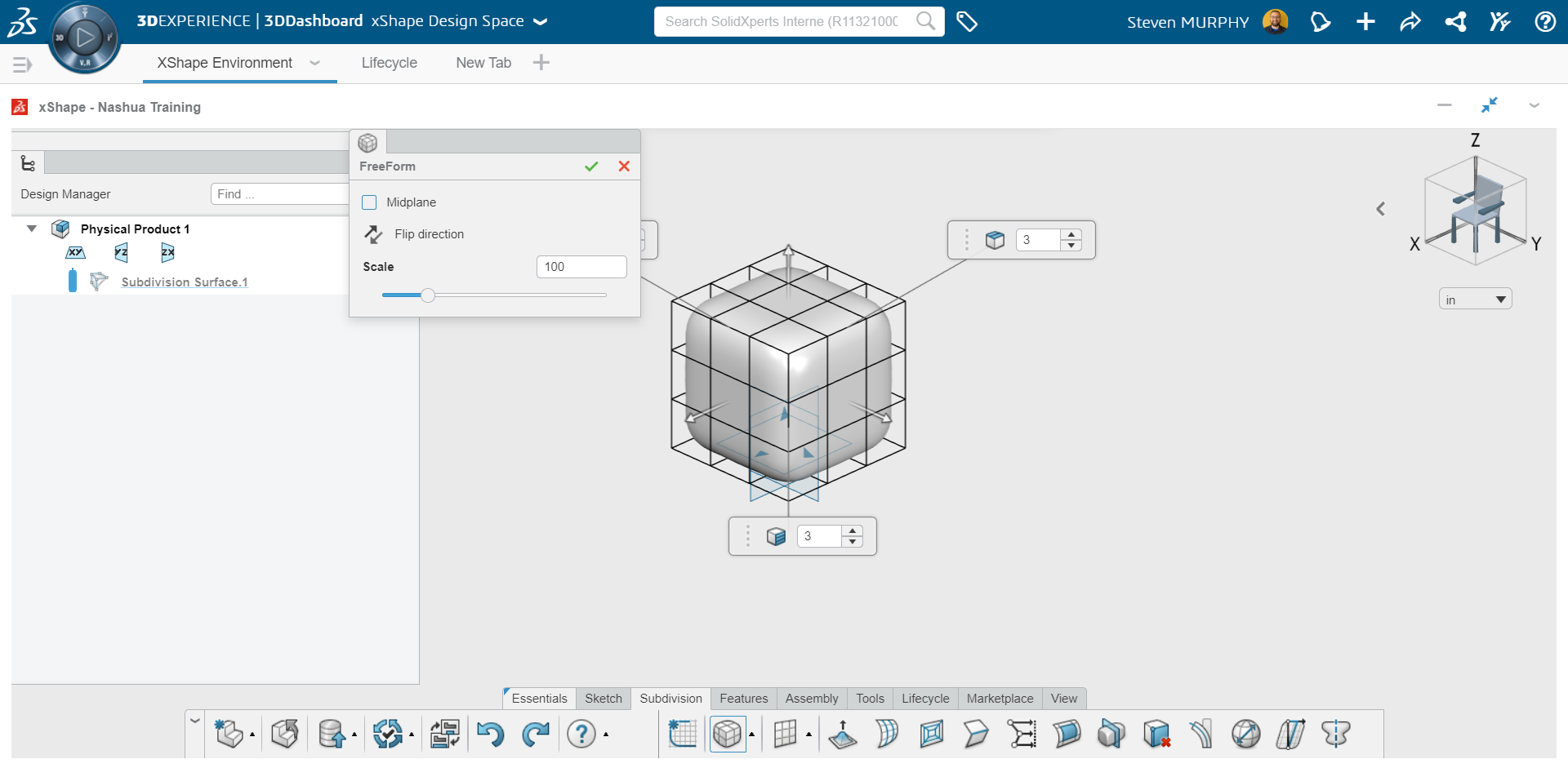
      XShape is the premier SubD cloud application available on the 3DExperience platform. Many industrial designers know the challenge of replicating complex surfaces inside of any CAD package. XShape allows for the creations of surfaces and parts using push-pull manipulation of primitive shapes while maintaining continuity. This functionality greatly surpasses the ability of SOLIDWORKS Freeform to create your aesthetically pleasing complex surfaces with your CAD file. On top of that, the SOLIDWORKS integration means that you can drag and drop the files from your web browser right into your model.

      If you are doing any surfacing, industrial design, or non- parametric modeling, this application is a must have. Because this application was developed with SOLIDWORKS in mind, the seamless transition between software will support your workflow.


      XShape SubD Modeling


      3DExperience Marketplace

      Who knew that you have access to quality industrial suppliers worldwide within SOLIDWORKS itself? You can find the manufacturers that your product needs without having to spend time and effort creating your own supply chain. This especially powerful in an industry where rapid prototyped 3D printed parts are becoming the de facto standard. Directly integrated with your SOLIDWORKS model, you can get competitive pricing, see shipment costs, and determine which provider meets your deadline.


      The 3DExperience Marketplace is located in the “3DExperience Platform” add in located in SOLIDWORKS which provides the flexibility that any engineer can take advantage of. Let Dassault Systèmes qualify the manufacturers for you, all you need to do is provide the model!


      3DExperience Marketplace Within the Task Pane


      The 3DExperience brings value to all conventional SOLIDWORKS users, expanding the tools available to bolster your workflow. The platform provides you with the ability to create new types of models, store and access data online, as well as easily identify manufacturers based on your requirements. From here, the Dassault Systèmes ecosystem will only continue to adapt and grow.


      Interested in the 3DExperience Platform? Reach out to our Xperts anytime with any questions or for more information.

      X_green_halo

      Any questions? Need help? Ask one of our experts.

      Whether you’re ready to get started or just have a few more questions, you can contact us toll-free:
          Download

            Download

              Download

              All search results