Make Your Data Work for You with 6W Tags on the 3DEXPERIENCE Platform

BLOG

Make Your Data Work for You with 6W Tags on the 3DEXPERIENCE Platform

[techtips_featured_image_shortcode]

The 3DEXPERIENCE platform isn’t just about CAD in the cloud. It’s your all-in-one workspace where design, data management, and collaboration come together. Whether you’re sketching with xShape, modeling in xDesign, or connecting to SOLIDWORKS, the platform helps keep everything, and everyone, in sync.
But let’s be honest: every engineering project generates mountains of data. 3D models, drawings, BOMs, simulations, even invoices and Word docs. It all piles up. The good news? The platform makes it easy to organize and navigate this information with a powerful tool called 6W Tags.

What Are 6W Tags?

Think of 6W Tags as smart labels that make it easy to filter, sort, and find your files in 3DSpace or 3DDrive.

6W Tags in SOLIDWORKS

And it’s not just CAD data. Office documents, simulation results, and more can all benefit from tagging.

Here’s how the 6Ws break down:

  • What: Type of content (CAD models, documents, simulations, tasks, etc.)
  • Who: The person who uploaded, edited, revised, or owns the data
  • When: Date or time range
  • Where: Geolocation or data source
  • How: Manufacturing method (made in-house or purchased)
  • Why: Links to project or task management

Out of the box, the system automatically fills in basics like owner, location, and save date. But the real power comes when your team adds custom tags. For example, you can include project numbers, material types, or vendor names so searches are tailored to your company’s workflow.

How to Use 6W Tags

Let’s say you search for “bolt” in 3DEXPERIENCE. Without filters, you might get hundreds (if not thousands) of results. That’s where 6W Tags shine.

Search bar for 6W Tags in SOLIDWORKS

Click the tag icon next to the search bar, then start narrowing your results. For example:

  • Under What, choose Physical Product (to exclude tasks or documents).
  • Add a Material filter for Stainless Steel.

By stacking filters, your results go from overwhelming to precise in just a few clicks.

Real-World Examples

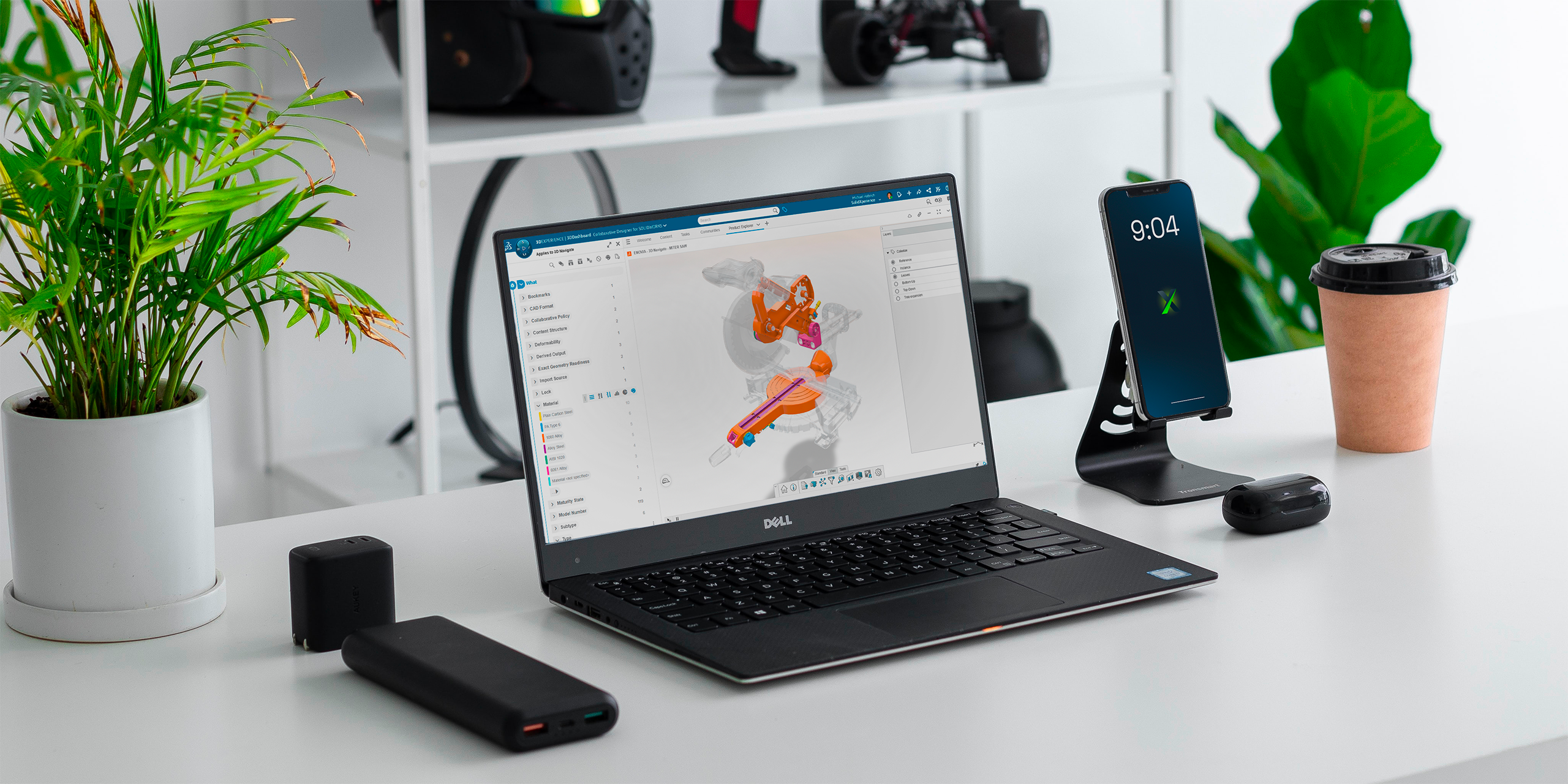
In one test, a simple search brought back over 1,000 results. But after filtering with 6W Tags for “Physical Product” and “Plain Carbon Steel,” the number of results dropped down to two digits. That’s the power of smart filtering.

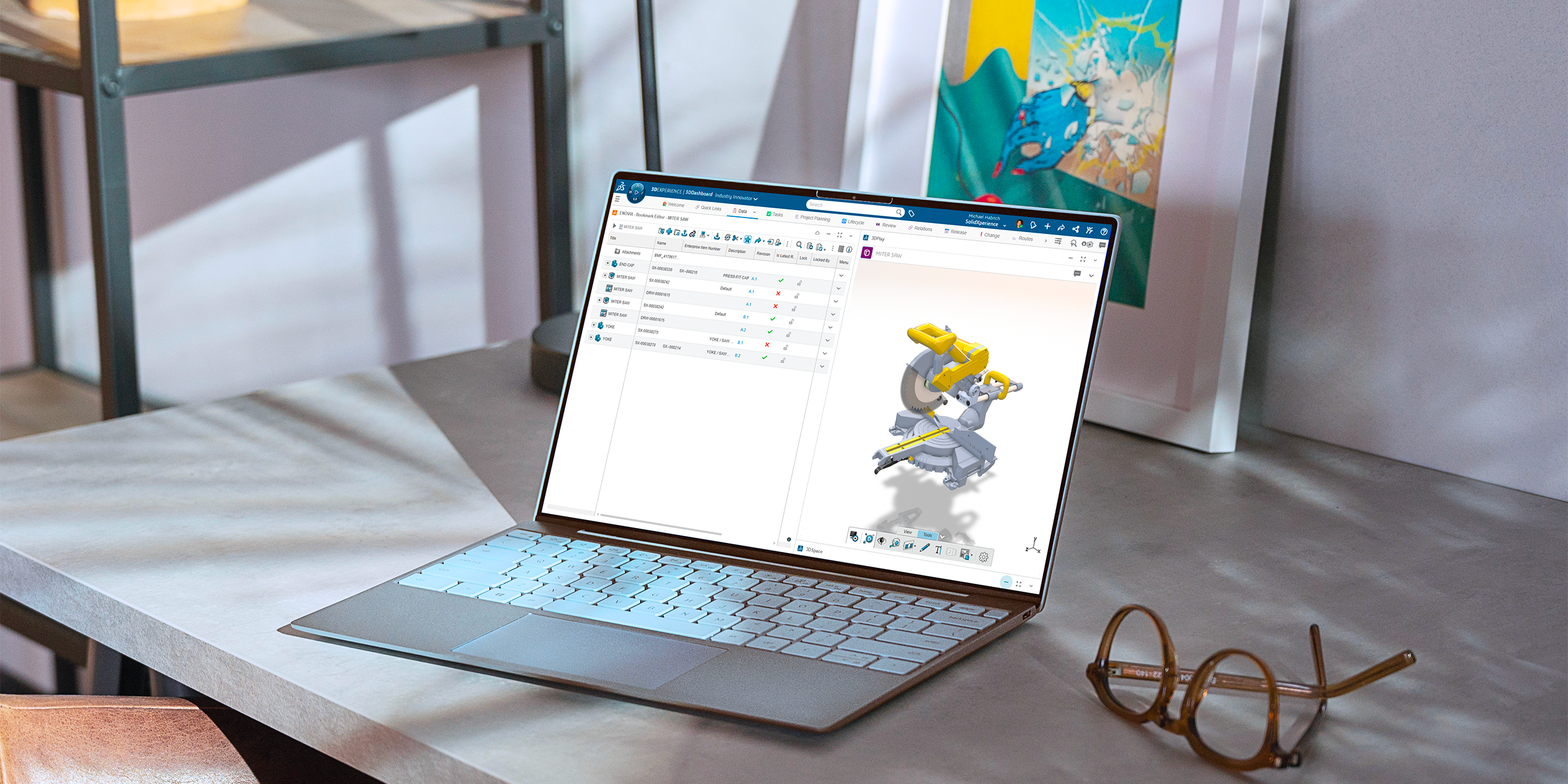
Beyond search, 6W Tags can be used visually inside apps. For example, parts can be color-coded by material in the graphics area, giving you an instant overview of your design.

From Data Overload to Data Control

Data shouldn’t slow you down and with 6W Tags, it won’t. Whether you’re hunting down a single file or organizing entire projects, the 3DEXPERIENCE platform helps you stay in control.

Want to learn more tips like this? Our experts at Solidxperts can help you get the most out of your 3DEXPERIENCE environment. Reach out anytime or join one of our training sessions!


Michael Habrich

3DEXPERIENCE Specialist

LinkedIn

X_green_halo

Any questions? Need help? Ask one of our experts.

Whether you’re ready to get started or just have a few more questions, you can contact us toll-free:

    Organizing and Managing Your SOLIDWORKS Libraries in 3DEXPERIENCE

    BLOG

    Organizing and Managing Your SOLIDWORKS Libraries in 3DEXPERIENCE

    [techtips_featured_image_shortcode]

    One of the biggest strengths of the 3DEXPERIENCE platform is how it brings your team together. With SOLIDWORKS Cloud Services, you get built-in data management, making it simple to collaborate with colleagues, keep projects organized, and even access your designs on the go.

    Whether you’re working in SOLIDWORKS Connected or traditional SOLIDWORKS combined with Collaborative Designer for SOLIDWORKS, you have a direct link to the 3DEXPERIENCE platform, so opening, saving, and managing your model data feels seamless.

    But here’s the thing: design work goes beyond just parts and assemblies. You also rely on libraries, weldment profiles, sheet metal gauge tables, templates, routing components, and more. Keeping those libraries in sync across your team is just as important as managing your models. And with 3DEXPERIENCE, you can centralize those libraries too.

    Step 1: Create Your Library Structure

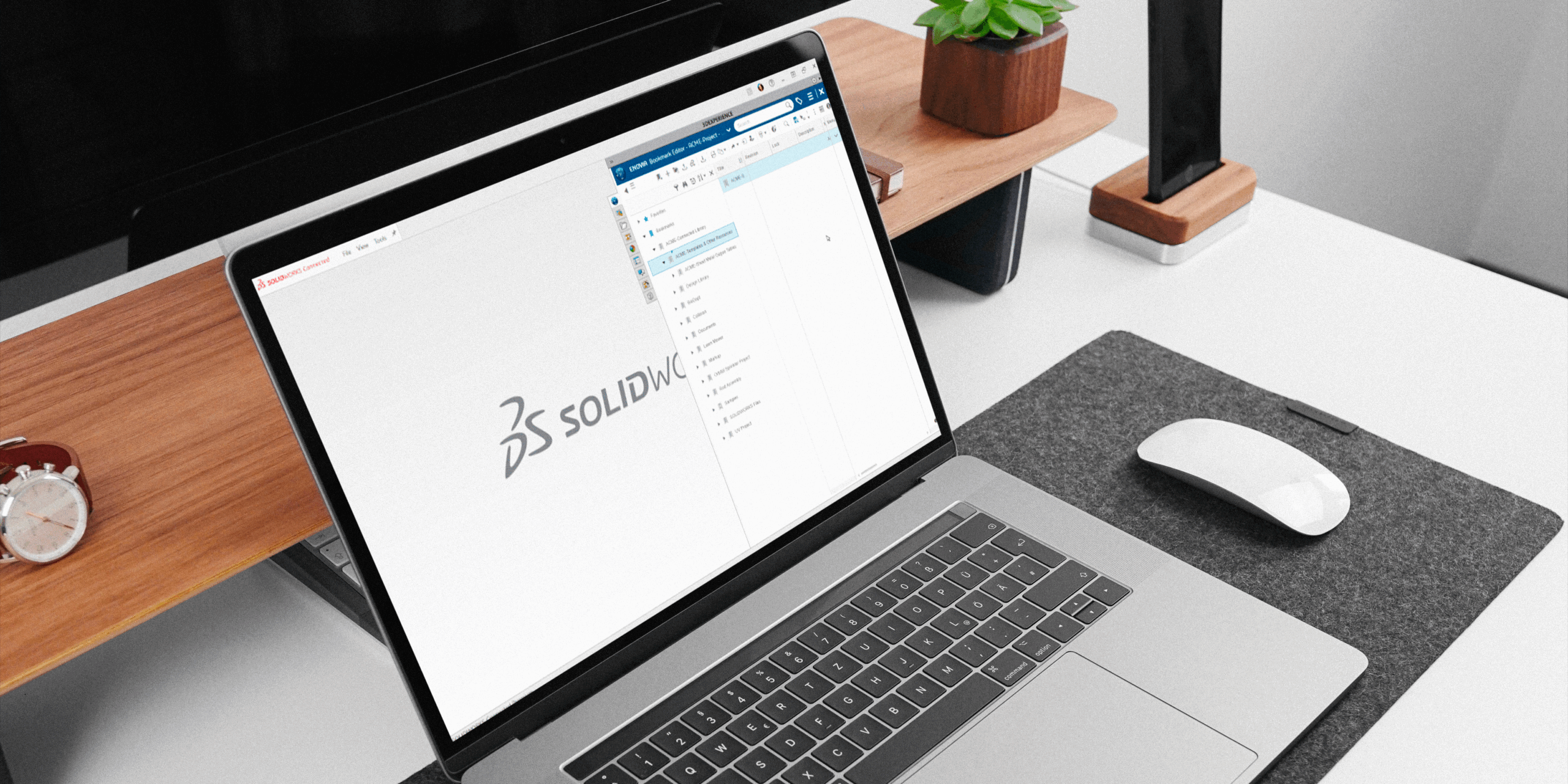
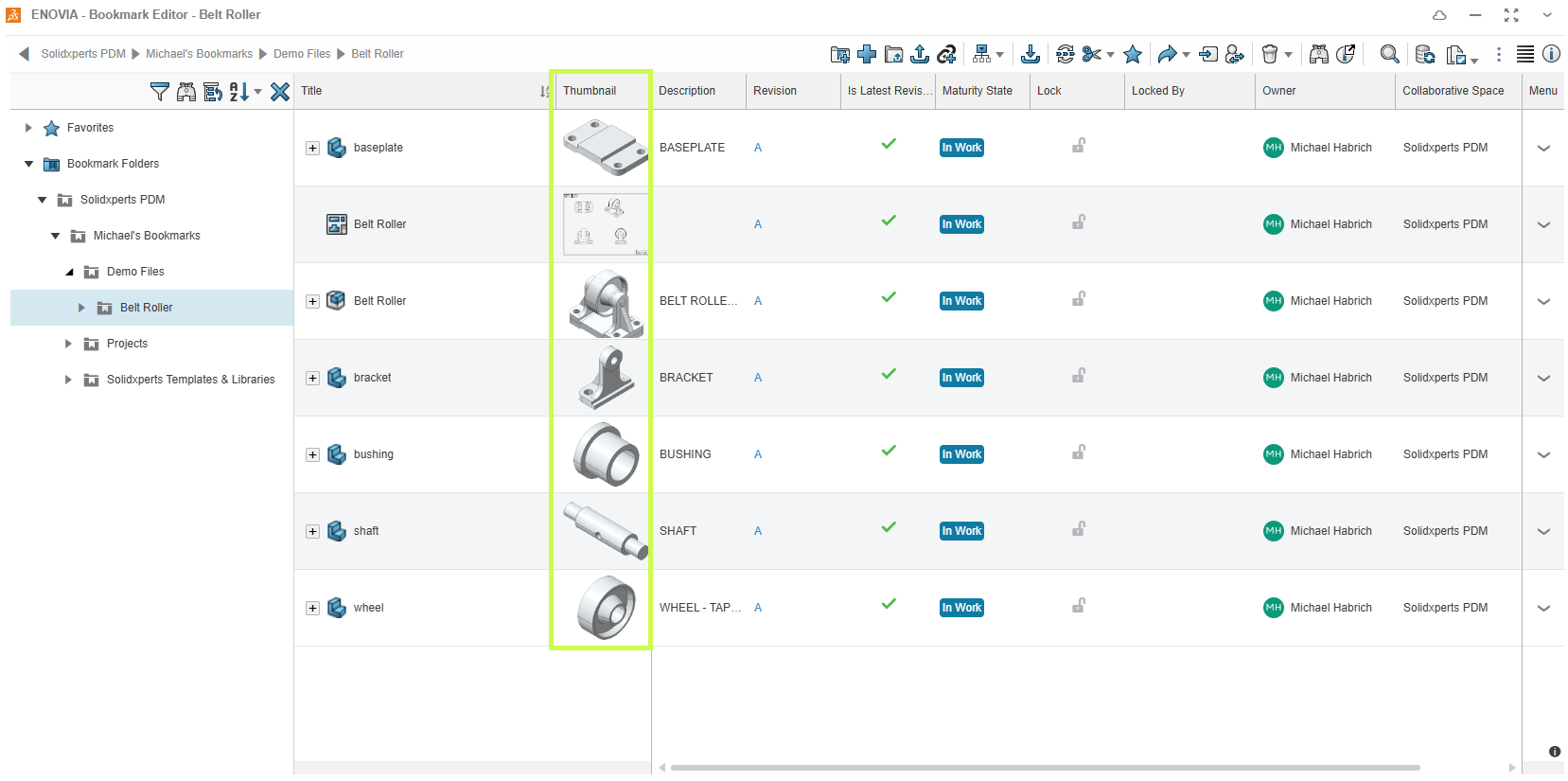
    Start in the Bookmark Editor app (in your web browser). Create a clean folder structure for your templates and libraries, with subfolders for each type. Then, simply drag and drop your files into place.

    This way, your team has one organized hub for all shared resources.

    Step 2: Set Up Weldment Profiles

    For weldments, it’s best to stick with a consistent naming convention: Standard → Type → Size.

    We also recommend customizing your standard names to keep them separate from the defaults SOLIDWORKS provides. For example, you might create a standard called “Xperts – ANSI Inch”.

    Once you’ve named things properly, drag your weldment profile files (or entire folders) from Windows File Explorer directly into your 3DEXPERIENCE bookmark. Quick, easy, and ready to use.

    Step 3: Connect Libraries to SOLIDWORKS

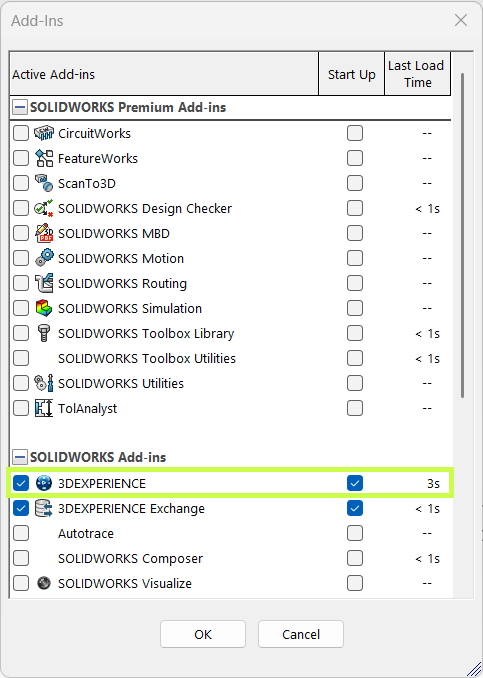
    Inside SOLIDWORKS, go to System Options → File Locations. When you add a new location, choose “Select from 3DEXPERIENCE”.

    This links SOLIDWORKS to your bookmarks, syncing the content down to your local cache (usually found at C:\Users\Public\Documents\SOLIDWORKS). You’ll notice the linked locations show up in brackets, confirming they’re tied to the platform.

    To make sure you’re always up to date, just click Update. SOLIDWORKS will pull the latest versions from 3DEXPERIENCE, keeping your whole team in sync.

    Step 4: Keep Your Libraries Updated

    Need to update a file? Head back into the Bookmark Editor in your browser, right-click the file, and select Update. Browse for the new version locally, and the platform will take care of the rest.

    Once it’s updated in 3DEXPERIENCE, users just need to hit Update in their SOLIDWORKS options to refresh their local cache. Simple, controlled, and consistent.

    Why This Matters

    Storing your libraries and templates alongside your design data gives you the same benefits: revision control, lifecycle management, and a single source of truth for your team.

    We focused on weldment profiles here, but the same approach works for routing components, sheet metal gauge tables, and more. With SOLIDWORKS Cloud Services + 3DEXPERIENCE, you’re not just managing files. You’re creating a smarter, more connected workflow for your entire team.

    At Solidxperts, we love helping teams get the most out of their tools. Setting up your libraries in 3DEXPERIENCE is a small step that makes a big impact on collaboration, efficiency, and design quality.


    Michael Habrich

    3DEXPERIENCE Specialist

    LinkedIn

    X_green_halo

    Any questions? Need help? Ask one of our experts.

    Whether you’re ready to get started or just have a few more questions, you can contact us toll-free:

      Creating Custom Attributes in the 3DEXPERIENCE platform

      BLOG

      Creating Custom Attributes in the 3DEXPERIENCE platform

      [techtips_featured_image_shortcode]

      Sometimes the standard attributes in the 3DEXPERIENCE platform just aren’t enough. Maybe you need a custom field to track a project code, client name, or any other detail that’s specific to your workflow. The good news? You can create your own attributes in just a few steps and we’ll show you how.

      Before You Start

      To build custom attributes, you’ll need:

      • Administrative privileges on your platform

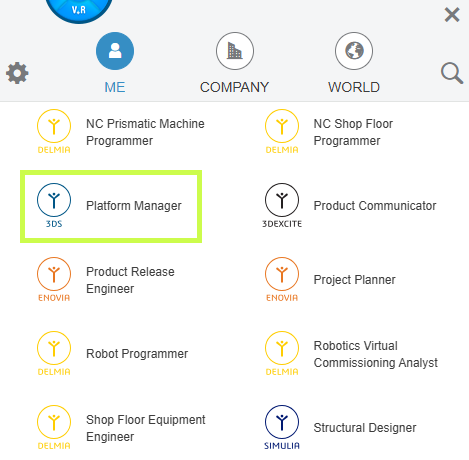
      • The Platform Manager role assigned to your profile

      Platform Manager

      Once that’s in place, you’re ready to go.

      Step 1: Open Attributes Management

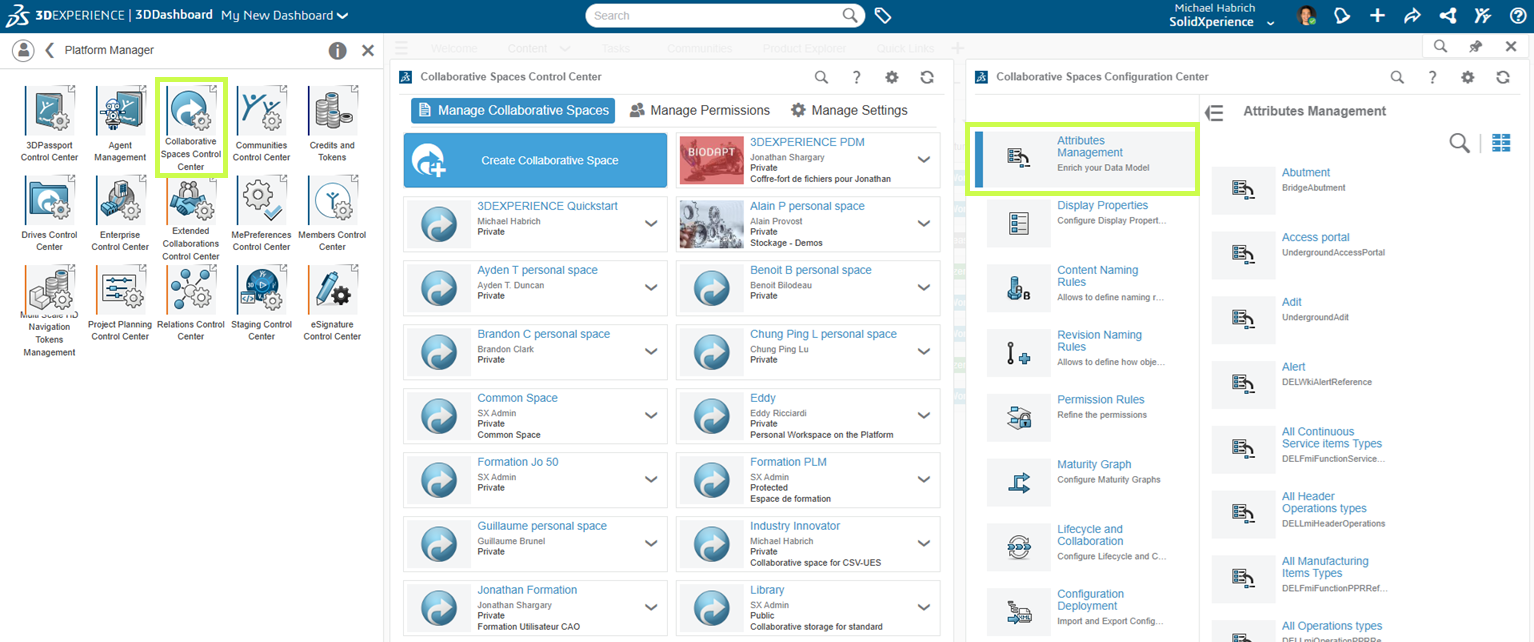
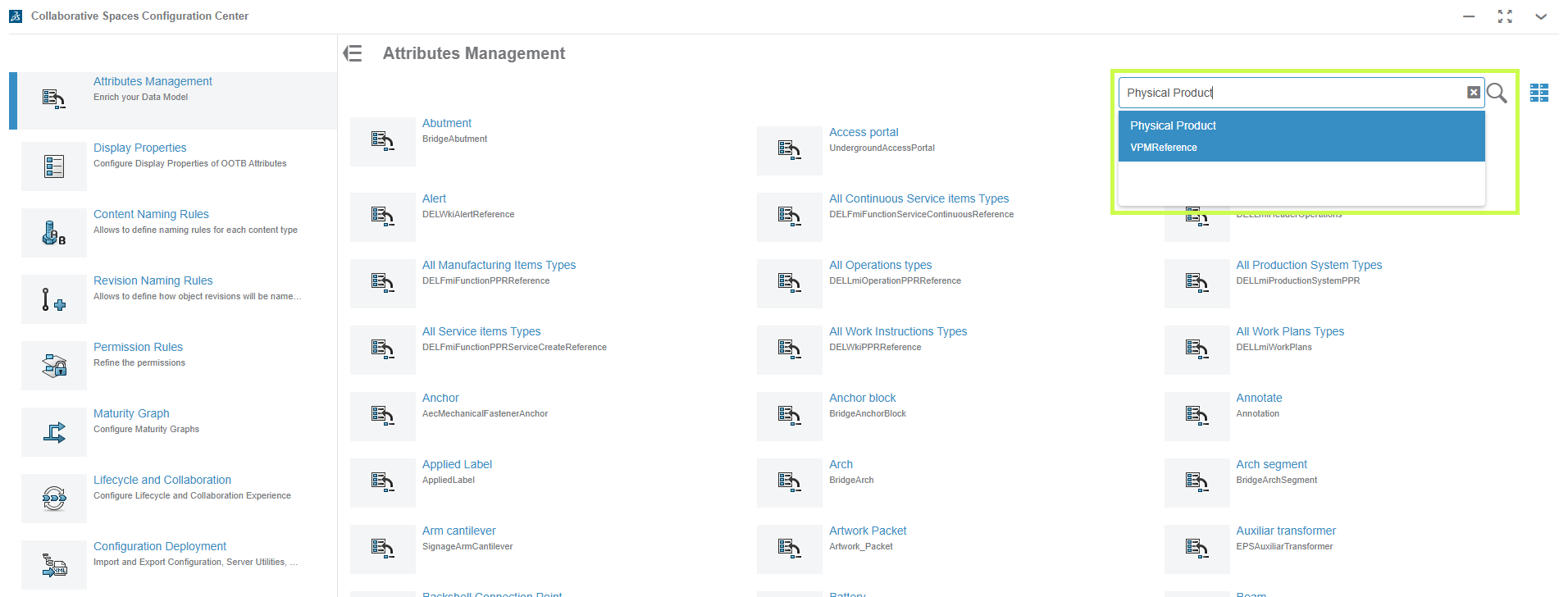
      1. Select the Platform Management role.

      2. Head into the Collaborative Spaces Control Center.

      3. From there, choose Attributes Management.

      Create a Collaborative Space

      This is where all the customization magic happens.

      Step 2: Find Physical Product

      In the search bar (click the little magnifying glass), type Physical Product.

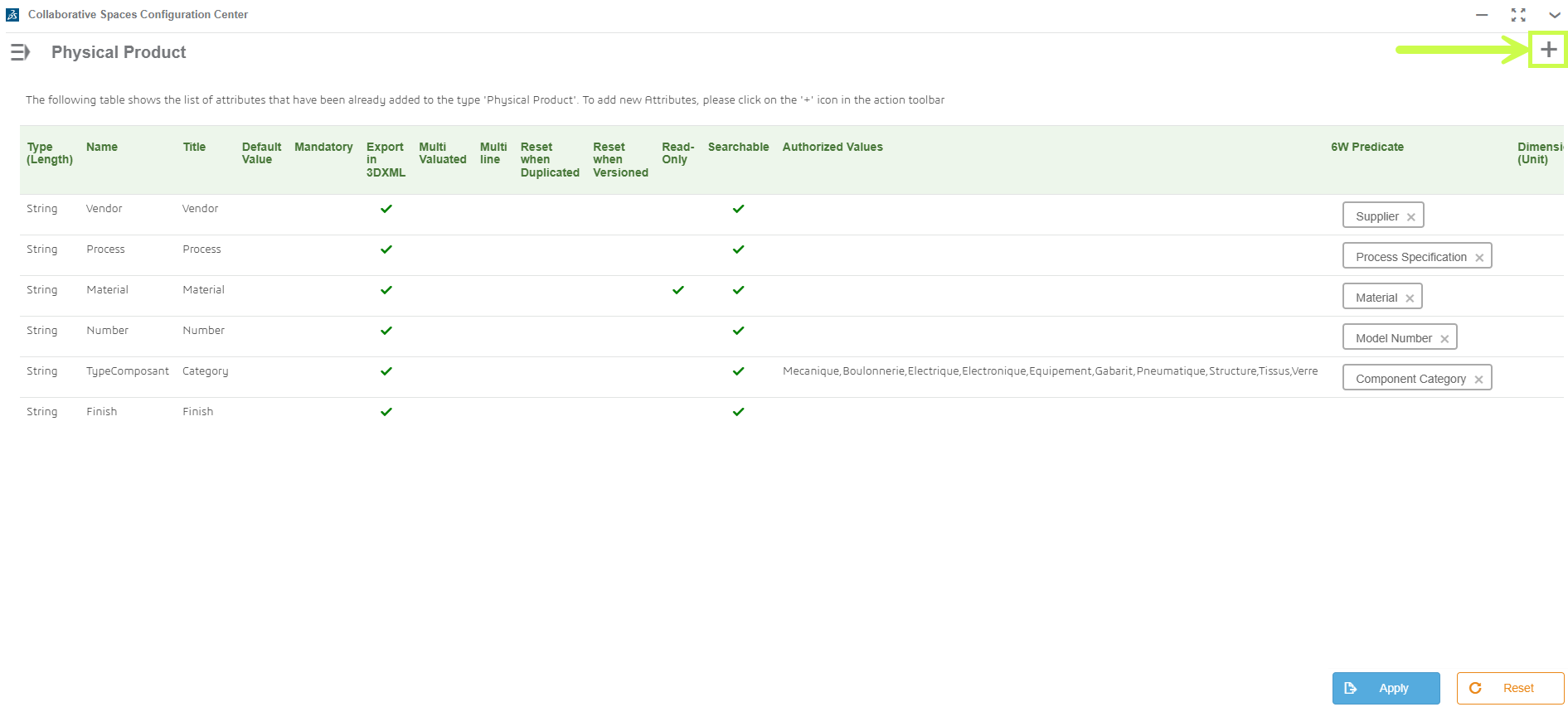
      This is the object type where most custom attributes live, alongside built-ins like Material or Weight.

      Attribute - Physical Product

      Step 3: Create Your Attribute

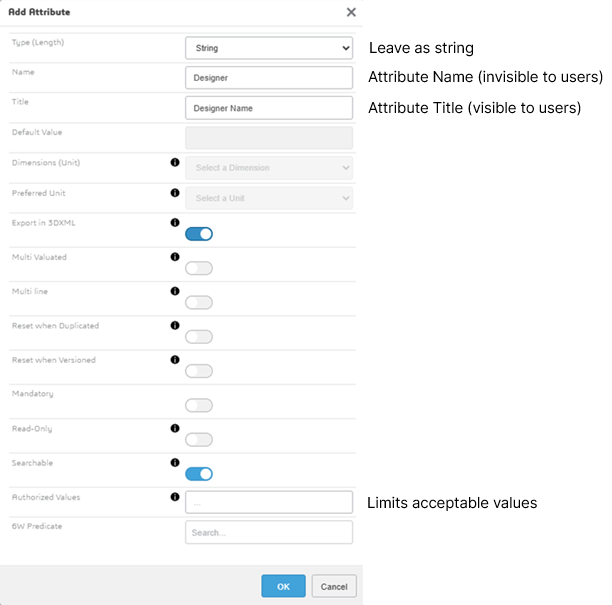
      1. Click the plus sign in the top-right corner.

      Create your attribute in the 3DEXPERIENCE platform

      1. Choose a unique name (no duplicates, no special characters).

      Choose a unique name

      1. Hit OK and your new attribute will appear at the bottom of the Physical Product page.

      Apply

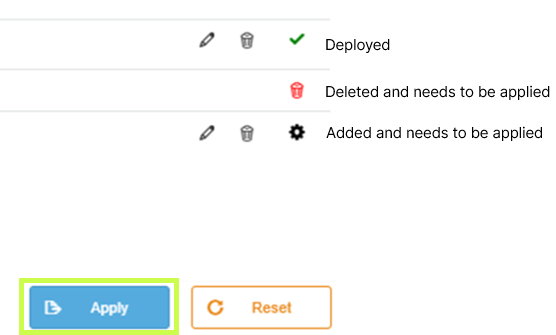
      Pro tip: if you don’t see the green check mark, it means the attribute hasn’t been activated yet.

      Step 4: Activate and Deploy

      To make your new attribute usable:

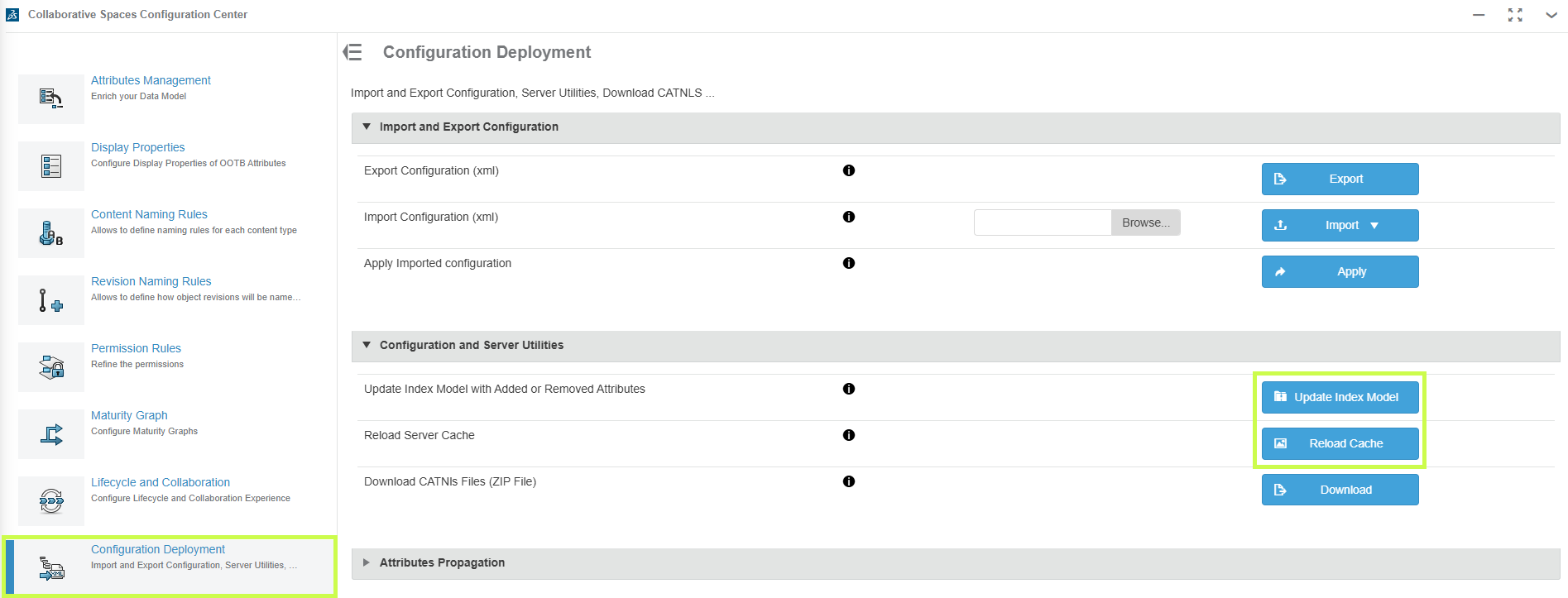
      1. Click Apply.

      2. Go to the Collaborative Spaces Configuration Center.

      3. Run Update Index Model and Reload Cache.

      Active and Deploy in the 3DEXPERIENCE platform

      Heads-up: this part may take a few minutes. Be patient while the platform updates.

      Step 5: Test It Out

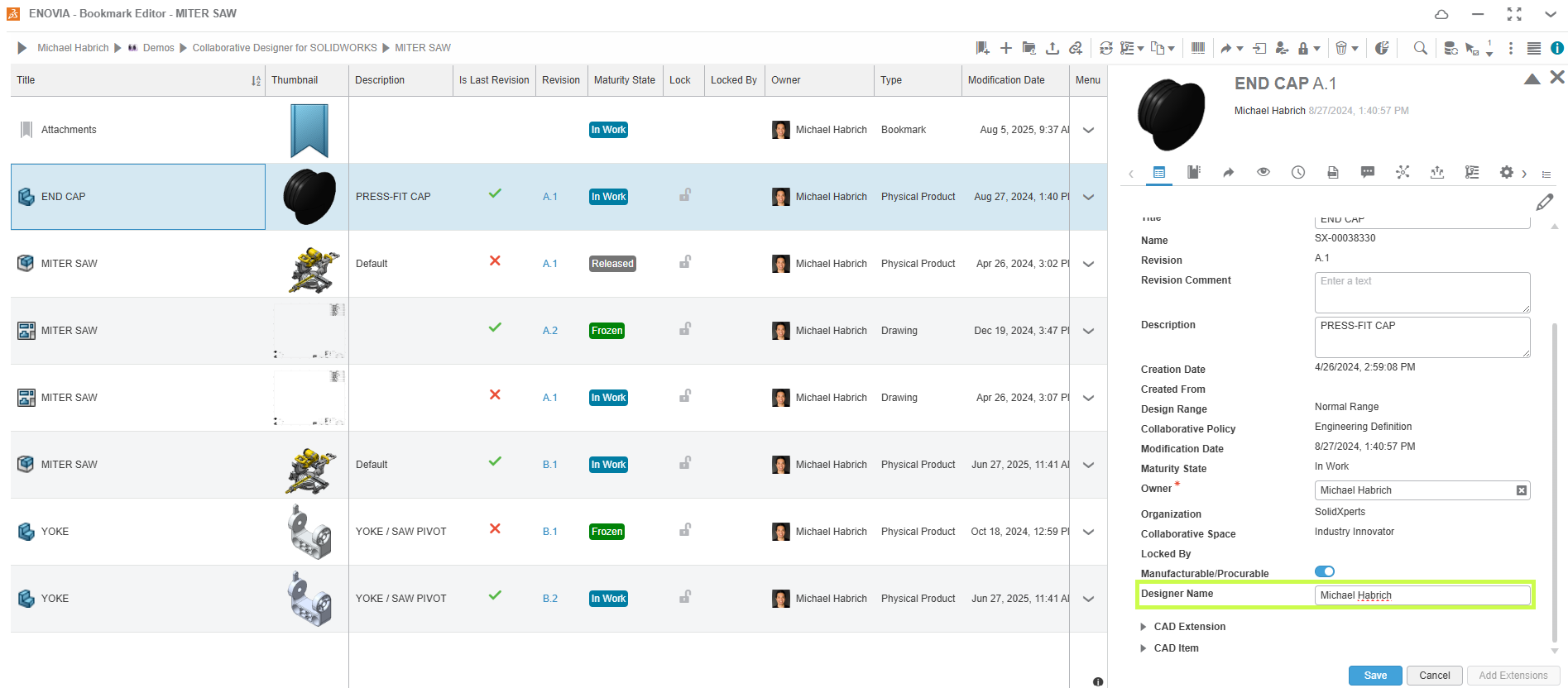
      Open any saved 3D part, click the down arrow > Information, and scroll down. Your new custom attribute should now be visible and ready to use. Add a value to confirm everything’s working as expected.

      Test it out in the 3DEXPERIENCE Platform

      Why Custom Attributes Matter

      By creating custom attributes, you’re tailoring the 3DEXPERIENCE platform to fit your business. That means:

      • Better search results

      • Smarter organization

      • Easier categorization of your data

      At Solidxperts, we’re all about helping you get the most out of your tools. Custom attributes are just one way to make your 3DEXPERIENCE platform work harder for you.

      Need a hand setting them up? Our team can walk you through it and make sure your environment is optimized for your exact workflow.


      Michael Habrich

      3DEXPERIENCE Specialist

      LinkedIn

      X_green_halo

      Any questions? Need help? Ask one of our experts.

      Whether you’re ready to get started or just have a few more questions, you can contact us toll-free:

        What’s New in SOLIDWORKS 2026? Part 6 – 2D CAD

        BLOG

        What’s New in SOLIDWORKS 2026? Part 6 – 2D CAD

        [techtips_featured_image_shortcode]

        DraftSight 2026 pushes 2D CAD innovation even further, with powerful new features designed to streamline workflows, enhance collaboration, and bring more automation into your drafting environment. Whether you’re working in architecture, manufacturing, or engineering, these updates help bridge 2D and 3D workflows, boost productivity, and simplify project management.

        Here are the Top 10 Enhancements you need to know in DraftSight 2026:

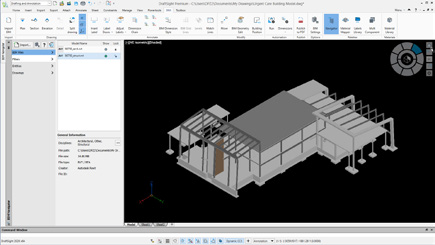
        1. BIM Module

        DraftSight now connects the worlds of 2D drafting and Building Information Modeling (BIM). Import RVT and IFC files to automatically generate plans, sections, elevations, and schedules.

        What's New in SOLIDWORKS 2026? P.6.1.
        Benefit: Bridge 3D and 2D collaboration, improving accuracy and communication across project teams.

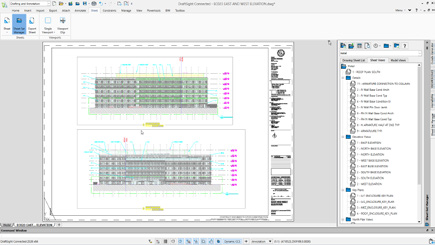
        2. Sheet Set Manager on the Platform

        Project documentation just got easier. The new Sheet Set Manager standardizes how drawing sheets are created, grouped, templated, and published, all from the 3DEXPERIENCE platform.

        What's New in SOLIDWORKS 2026? P.6.2.
        Benefit: Simplify documentation, ensure consistency, and speed up publishing workflows.

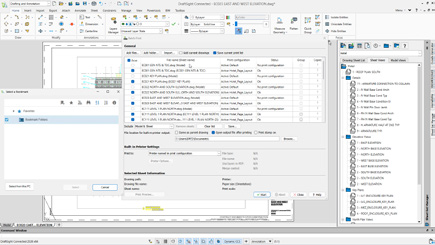
        3. Batch Print Files in Collaborative Space

        Save time with batch printing directly from the Collaborative Space. Process multiple DWG files at once, ensuring all team members are always working with and printing the latest version.

        What's New in SOLIDWORKS 2026? P.6.3.
        Benefit: Accelerate printing workflows and guarantee output consistency.

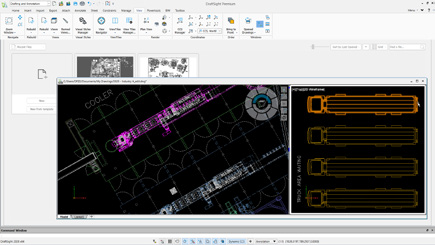
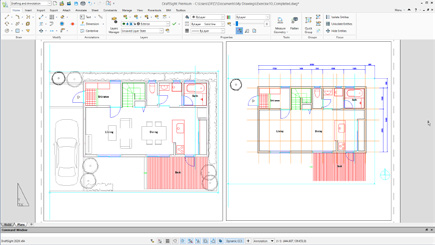
        4. Float Document Windows

        Multi-monitor users rejoice: DraftSight 2026 allows you to detach drawing tabs into separate windows for true multitasking. Compare and edit drawings side by side across monitors.

        What's New in SOLIDWORKS 2026? P.6.4.
        Benefit: Boost productivity by working seamlessly across multiple drawings at once.

        5. Centralized Start Hub

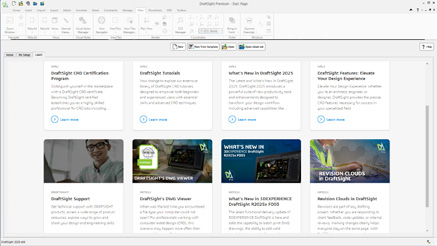
        A new Start Hub streamlines how you begin every project. From one centralized location, access projects, recent files, workspace settings, and learning resources.

        What's New in SOLIDWORKS 2026? P.6.5.
        Benefit: Start faster and stay organized from the moment you launch DraftSight.

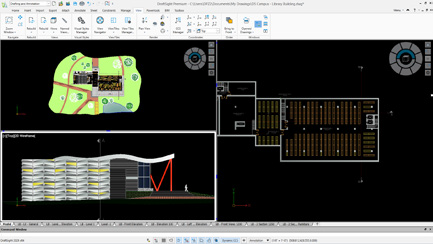
        6. Resizable View Tiles in Model Space

        Navigate complex models with ease by resizing and aligning multiple view tiles within model space. This makes simultaneous navigation and editing of different model areas more efficient.

        What's New in SOLIDWORKS 2026? P.6.6.
        Benefit: Work smarter with customizable, side-by-side model views.

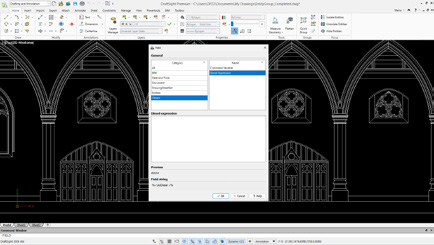
        7. Field Command: Diesel Expression Support

        The Field command now supports Diesel expressions, allowing dynamic text automation and inline calculations inside your drawings.

        What's New in SOLIDWORKS 2026? P.6.7.
        Benefit: Automate calculations and add conditional formatting directly to drawing text.

        8. Improved Ribbon Tabs Content

        The Ribbon interface has been cleaned up and reorganized for better usability. Enjoy faster access to commands, more intuitive layouts, and customizable workspace options.

        What's New in SOLIDWORKS 2026? P.6.8.
        Benefit: Streamline your drafting workflows with a more modern, intuitive UI.

        9. DATAEXTRACTION Command Improvements

        Data extraction is faster and more powerful. New features include CSV headers and formula columns, reducing manual work and making it easier to integrate extracted data with external applications.

        What's New in SOLIDWORKS 2026? P.6.9.
        Benefit: Cut down on errors and speed up data reporting workflows.

        10. Files Attachable From the 3DEXPERIENCE Platform

        Collaboration in the cloud takes a big step forward: DWG files stored on the 3DEXPERIENCE platform can now be attached as external references directly in DraftSight.

        What's New in SOLIDWORKS 2026? P.6.10.
        Benefit: Simplify data management and keep everyone working on the latest version of project files.

        The Future of 2D CAD Starts Here

        DraftSight 2026 isn’t just about drafting faster, it’s about working smarter, collaborating seamlessly, and bridging 2D with 3D workflows. From BIM integration to cloud-based collaboration and new automation tools, these enhancements set a new standard for productivity in CAD.

        Want to unlock the full power of DraftSight 2026? Our experts are ready to support your team with tailored guidance, training, and workflow optimization.


        Michael Habrich

        3DEXPERIENCE Specialist

        LinkedIn

        X_green_halo

        Any questions? Need help? Ask one of our experts.

        Whether you’re ready to get started or just have a few more questions, you can contact us toll-free:

          What’s New in SOLIDWORKS 2026? Part 6 – 2D CAD

          BLOG

          What’s New in SOLIDWORKS 2026? Part 6 – 2D CAD

          [techtips_featured_image_shortcode]

          DraftSight 2026 pushes 2D CAD innovation even further, with powerful new features designed to streamline workflows, enhance collaboration, and bring more automation into your drafting environment. Whether you’re working in architecture, manufacturing, or engineering, these updates help bridge 2D and 3D workflows, boost productivity, and simplify project management.

          Here are the Top 10 Enhancements you need to know in DraftSight 2026:

          1. BIM Module

          DraftSight now connects the worlds of 2D drafting and Building Information Modeling (BIM). Import RVT and IFC files to automatically generate plans, sections, elevations, and schedules.

          What's New in SOLIDWORKS 2026? P.6.1.
          Benefit: Bridge 3D and 2D collaboration, improving accuracy and communication across project teams.

          2. Sheet Set Manager on the Platform

          Project documentation just got easier. The new Sheet Set Manager standardizes how drawing sheets are created, grouped, templated, and published, all from the 3DEXPERIENCE platform.

          What's New in SOLIDWORKS 2026? P.6.2.
          Benefit: Simplify documentation, ensure consistency, and speed up publishing workflows.

          3. Batch Print Files in Collaborative Space

          Save time with batch printing directly from the Collaborative Space. Process multiple DWG files at once, ensuring all team members are always working with and printing the latest version.

          What's New in SOLIDWORKS 2026? P.6.3.
          Benefit: Accelerate printing workflows and guarantee output consistency.

          4. Float Document Windows

          Multi-monitor users rejoice: DraftSight 2026 allows you to detach drawing tabs into separate windows for true multitasking. Compare and edit drawings side by side across monitors.

          What's New in SOLIDWORKS 2026? P.6.4.
          Benefit: Boost productivity by working seamlessly across multiple drawings at once.

          5. Centralized Start Hub

          A new Start Hub streamlines how you begin every project. From one centralized location, access projects, recent files, workspace settings, and learning resources.

          What's New in SOLIDWORKS 2026? P.6.5.
          Benefit: Start faster and stay organized from the moment you launch DraftSight.

          6. Resizable View Tiles in Model Space

          Navigate complex models with ease by resizing and aligning multiple view tiles within model space. This makes simultaneous navigation and editing of different model areas more efficient.

          What's New in SOLIDWORKS 2026? P.6.6.
          Benefit: Work smarter with customizable, side-by-side model views.

          7. Field Command: Diesel Expression Support

          The Field command now supports Diesel expressions, allowing dynamic text automation and inline calculations inside your drawings.

          What's New in SOLIDWORKS 2026? P.6.7.
          Benefit: Automate calculations and add conditional formatting directly to drawing text.

          8. Improved Ribbon Tabs Content

          The Ribbon interface has been cleaned up and reorganized for better usability. Enjoy faster access to commands, more intuitive layouts, and customizable workspace options.

          What's New in SOLIDWORKS 2026? P.6.8.
          Benefit: Streamline your drafting workflows with a more modern, intuitive UI.

          9. DATAEXTRACTION Command Improvements

          Data extraction is faster and more powerful. New features include CSV headers and formula columns, reducing manual work and making it easier to integrate extracted data with external applications.

          What's New in SOLIDWORKS 2026? P.6.9.
          Benefit: Cut down on errors and speed up data reporting workflows.

          10. Files Attachable From the 3DEXPERIENCE Platform

          Collaboration in the cloud takes a big step forward: DWG files stored on the 3DEXPERIENCE platform can now be attached as external references directly in DraftSight.

          What's New in SOLIDWORKS 2026? P.6.10.
          Benefit: Simplify data management and keep everyone working on the latest version of project files.

          The Future of 2D CAD Starts Here

          DraftSight 2026 isn’t just about drafting faster, it’s about working smarter, collaborating seamlessly, and bridging 2D with 3D workflows. From BIM integration to cloud-based collaboration and new automation tools, these enhancements set a new standard for productivity in CAD.

          Want to unlock the full power of DraftSight 2026? Our experts are ready to support your team with tailored guidance, training, and workflow optimization.


          Michael Habrich

          3DEXPERIENCE Specialist

          LinkedIn

          X_green_halo

          Any questions? Need help? Ask one of our experts.

          Whether you’re ready to get started or just have a few more questions, you can contact us toll-free:

            What’s New in SOLIDWORKS 2026? Part 5 – Electrical

            BLOG

            What’s New in SOLIDWORKS 2026? Part 5 – Electrical

            [techtips_featured_image_shortcode]

            SOLIDWORKS Electrical 2026 introduces powerful improvements across schematic design, routing, collaboration, and documentation. With enhanced library management and stronger ECAD-MCAD connectivity, teams can work faster, reduce errors, and maintain consistency throughout the design process. Below are the ten most impactful enhancements and the benefits they deliver.

            1. Accessory Parts Assigned Directly to Terminals or Circuits

            Accessory components such as fuses, pins, sockets, seals, and plugs can now be linked directly to terminals or circuits in 2D. This simplifies bills of materials, sharpens assembly instructions, and prevents miscommunication during manufacturing.

            What's New in SOLIDWORKS? P.5.1

            Benefit: Create more complete, accurate electrical documentation without needing to model every accessory.

            2. More Flexible PDF Export

            New PDF export options let you organize output by project, book, or page while automatically adjusting page orientation.

            What's New in SOLIDWORKS? P.5.2

            Benefit: Produce clear, well-structured PDFs with minimal manual formatting.

            3. Faster Manufacturer Part and Cable Reference Import

            Direct Excel import for manufacturer parts and cable references streamlines library creation, and multi-item entry for circuits, terminals, and cable cores accelerates setup.

            What's New in SOLIDWORKS? P.5.3

            Benefit: Build and maintain precise libraries with significantly less effort.

            4. Load and Reload From 3DEXPERIENCE Libraries

            Teams can now load and reload electrical libraries directly from the 3DEXPERIENCE platform, simplifying updates and ensuring shared content remains aligned.

            What's New in SOLIDWORKS? P.5.4

            Benefit: Strengthen collaboration and reduce inconsistencies with centralized library management.

            5. Save Local Libraries to 3DEXPERIENCE

            Users can contribute local libraries back to the platform to keep content unified across the organization.

            What's New in SOLIDWORKS? P.5.5

            Benefit: Eliminate redundant work and maintain standardized electrical content across teams.

            6. New Role: SOLIDWORKS Electrical 3D Augmented

            This new role deepens the connection between 3D CAD and Electrical Schematic on the 3DEXPERIENCE platform. Users can place components in 3D, route wires and cables automatically, and generate production-ready outputs such as wire lengths and harness drawings.

            What's New in SOLIDWORKS? P.5.6

            Benefit: Align schematic and 3D workflows for highly accurate routing and documentation.

            7. Route Wires Property Manager Enhancement

            Harness design gains precision with the ability to route individual wires or groups of wires directly through the Route Wires property manager.

            What's New in SOLIDWORKS? P.5.7

            Benefit: Improve control and flexibility during complex harness routing.

            8. Dynamic Connector Insertion

            Connector insertion is faster and more intuitive with direct symbol access, detailed circuit selection, and improved sorting and filtering options.

            What's New in SOLIDWORKS? P.5.8

            Benefit: Insert and manage connectors with greater accuracy and efficiency.

            9. Collaborative Server Enhancements

            All server communication is now initiated from the client side, simplifying firewall requirements and supporting modern IT security standards.

            What's New in SOLIDWORKS? P.5.9

            Benefit: Enhance network security and streamline IT integration.

            10. Improved ECAD-MCAD Collaboration With IDX 3.0

            CircuitWorks now supports IDX 3.0, enabling richer data exchange including parent-child relationships for keep-in, keep-out, PTH, and NPTH attributes. Users can also review and reverse MCAD changes before applying updates.

            What's New in SOLIDWORKS? P.5.10

            Benefit: Reduce errors, minimize rework, and accelerate design cycles through smarter cross-discipline collaboration.

            Key Takeaways for Electrical Design Teams

            With stronger tools for libraries, routing, connector management, and ECAD-MCAD collaboration, SOLIDWORKS Electrical 2026 helps teams deliver higher-quality electrical designs more efficiently. These enhancements are built to reduce duplicate work, streamline communication, and keep projects aligned from concept to final documentation.

            Ready to take your electrical design workflows further? Our team is here to help you explore every new capability.


            Michael Habrich

            3DEXPERIENCE Specialist

            LinkedIn

            X_green_halo

            Any questions? Need help? Ask one of our experts.

            Whether you’re ready to get started or just have a few more questions, you can contact us toll-free:

              What’s New in SOLIDWORKS 2026? Part 4 – PDM

              BLOG

              What’s New in SOLIDWORKS 2026? Part 4 – Simulation

              [techtips_featured_image_shortcode]

              SOLIDWORKS Simulation 2026 introduces a powerful suite of updates across Structural, Plastics, and Flow Simulation. From smarter load definitions and refined diagnostics to enhanced thermal analysis and molding predictions, these improvements give engineers greater control, faster feedback, and more realistic results.

              1. Force Options for Beams

              Engineers can now define beam forces as Per Item or Total, providing more flexibility and realism when applying structural loads.

              SOLIDWORKS 2026 - P.4.1
              Benefit: Achieve precise control to accurately represent real-world loading conditions.

              2. Validity Check Improvements

              Simulation setup is faster and more reliable, with clearer alerts for missing materials, invalid mesh controls, or incomplete fixtures. Streamlined messages and one-click deselection make troubleshooting easier.

              SOLIDWORKS 2026 - P.4.2
              Benefit: Resolve setup issues quickly and ensure higher simulation accuracy.

              3. Pin Connector Forces in Random Vibration

              Random vibration studies now include detailed force breakdowns, shear, axial, bending, and torque, at pin connectors.

              SOLIDWORKS 2026 - P.4.3
              Benefit: Capture realistic joint behavior for improved design confidence.

              4. Angular Displacement Plot Options

              Angular rotation can now be displayed in degrees or radians, aligning results with engineering standards or project requirements.

              SOLIDWORKS 2026 - P.4.4
              Benefit: Gain flexibility in interpreting and reporting displacement data.

              5. Shell Improvements

              Shell workflows are enhanced with new global defaults for thick or thin shells and the ability to apply distributed remote loads or mass along shell edges.

              SOLIDWORKS 2026 - P.4.5
              Benefit: Reduce setup time while improving accuracy in complex shell models.

              6. Component Explorer Enhancements

              Thermal analysis is more intuitive with new temperature and surface source columns in the Component Explorer, allowing quick identification of overheating areas or imbalanced heat sources.

              SOLIDWORKS 2026 - P.4.6
              Benefit: Perform faster, clearer thermal assessments at a glance.

              7. Fill Thin Slot for Thermal Modeling

              Automatically fill thin slots with defined materials to better simulate heat transfer in compact or bonded assemblies.

              SOLIDWORKS 2026 - P.4.7
              Benefit: Produce more realistic and reliable thermal simulation results.

              8. Edge-Based Air Vent Definition

              Define Air Vent boundary conditions directly on model edges for mold simulations, applicable to both cavity and runner domains.

              SOLIDWORKS 2026 - P.4.8
              Benefit: Improve venting accuracy and mold flow predictions.

              9. Remote Mass in Response Spectrum

              Assign remote masses to represent components not meshed in the study, ensuring their influence is accurately considered.

              SOLIDWORKS 2026 - P.4.9
              Benefit: Streamline simulation setup while maintaining result precision.

              10. Post-Processing Enhancements in Plastics

              A new Unfilled Volume plot complements short-shot predictions, allowing quick identification of incomplete injection zones.

              SOLIDWORKS 2026 - P.4.10
              Benefit: Detect and address molding issues faster for improved manufacturability.

              It’s Now your Turn to Harness the Full Power of SOLIDWORKS 2026

              From beam loading flexibility to smarter diagnostics and enhanced plastics visualization, SOLIDWORKS Simulation 2026 advances simulation accuracy and efficiency. These top 10 enhancements empower engineers to handle more complex scenarios, troubleshoot faster, and deliver designs with greater confidence.

              At Solidxperts, our Simulation Specialists help you unlock the full potential of SOLIDWORKS Simulation, from setup and validation to advanced analysis and automation. Whether upgrading to 2026 or streamlining complex studies, our experts will help you.


              Michael Habrich

              3DEXPERIENCE Specialist

              LinkedIn

              X_green_halo

              Any questions? Need help? Ask one of our experts.

              Whether you’re ready to get started or just have a few more questions, you can contact us toll-free:

                What’s New in SOLIDWORKS 2026? Part 3 – PDM

                BLOG

                What’s New in SOLIDWORKS 2026? Part 3 – PDM

                [techtips_featured_image_shortcode]

                SOLIDWORKS PDM 2026 delivers a strong set of enhancements focused on data security, workflow efficiency, and ease of use. Whether you’re managing thousands of files or just ensuring your projects stay safe and organized, these improvements help teams work more reliably and confidently.

                Here are the Top 10 Enhancements you need to know:

                1. Automatic File Recovery

                Checked-out files are safer than ever. PDM now automatically creates backups of modified files on the archive server, so they can be recovered in case of hardware failure or user absence.

                What's New in SOLIDWORKS? P.3.1
                Benefit: Avoid costly rework and ensure critical design changes are never lost.

                2. Archived Workflows for Cleaner Administration

                Keep the Admin Tool clutter-free by archiving unused workflows. This prevents outdated or incorrect workflows from being used, while making it easier for admins to manage active processes.

                What's New in SOLIDWORKS? P.3.2
                Benefit: Simplify administration and reduce errors with streamlined workflow management.

                3. Granular Folder Access Control

                New access rules allow you to grant visibility to subfolders without exposing parent folders. This gives you more precision in defining user rights while keeping sensitive data protected.

                What's New in SOLIDWORKS? P.3.3
                Benefit: Collaborate securely without compromising confidentiality.

                4. Static Previews for Third-Party CAD Files

                Save time by viewing static image previews of third-party CAD data directly in PDM. No need to open each file to confirm its contents.

                What's New in SOLIDWORKS? P.3.4
                Benefit: Faster file identification across mixed CAD environments.

                5. Smarter BOM Management in Web2

                Named BOMs can now be viewed and edited directly in the Web2 client. A collapsible variables panel helps maximize workspace, especially on smaller screens.

                What's New in SOLIDWORKS? P.3.5
                Benefit: Manage BOMs from anywhere with a more efficient and user-friendly interface.

                6. Stronger Security With AES-256 Encryption

                Data transfers are now protected with AES-256 encryption, bringing SOLIDWORKS PDM in line with stricter modern cybersecurity requirements.

                What's New in SOLIDWORKS? P.3.6
                Benefit: Ensure compliance and safeguard sensitive intellectual property.

                7. Modern Authentication With Kerberos Support

                PDM adds Kerberos authentication to its existing NTLM and NTLMv2 protocols, making it easier to integrate with enterprise Single Sign-On (SSO) and modern Windows environments.

                What's New in SOLIDWORKS? P.3.7
                Benefit: Seamlessly connect PDM to enterprise IT systems while improving login security.

                8. Smarter File Version Upgrades

                The File Version Upgrade Tool has been enhanced with more control options and a simplified interface. Users can decide which files to upgrade and how, with better progress tracking along the way.

                What's New in SOLIDWORKS? P.3.8
                Benefit: Reduce upgrade risks and keep projects running smoothly during version transitions.

                9. Expanded File Conversion Options

                Convert Task options are more powerful than ever. You can now specify Parasolid® or ACIS® versions and use advanced scripting for DraftSight® and Office-to-PDF conversions.

                What's New in SOLIDWORKS? P.3.9
                Benefit: Greater flexibility when collaborating with partners and suppliers using different formats.

                10. Streamlined Database Upgrades

                The Database Upgrade Wizard has been redesigned with clearer reporting, improved efficiency, and better error handling. Admins can now complete upgrades with more confidence and less downtime.

                What's New in SOLIDWORKS? P.3.10
                Benefit: Faster, more reliable upgrades that keep your system stable.

                Smarter, Safer, Stronger. PDM 2026 Sets a New Standard.

                With SOLIDWORKS PDM 2026, data is safer, workflows are cleaner, and administration is easier. From automatic file recovery to enterprise-grade encryption and authentication, these top 10 enhancements give teams the tools they need to manage design data securely and efficiently.

                Want to see how these updates can transform your setup? Let’s start the conversation.

                Michael Habrich

                3DEXPERIENCE Specialist

                LinkedIn

                X_green_halo

                Any questions? Need help? Ask one of our experts.

                Whether you’re ready to get started or just have a few more questions, you can contact us toll-free:

                  Making Sense of Collaborative Spaces in 3DEXPERIENCE

                  BLOG

                  Making Sense of Collaborative Spaces in 3DEXPERIENCE

                  [techtips_featured_image_shortcode]

                  If you’re new to the 3DEXPERIENCE platform, you’ve probably run into questions about Collaborative Spaces such as how they work, how visible they are, and who gets access. You’re not alone! At first glance, visibility settings and permissions can feel a little tricky, but once you understand the basics, managing Collaborative Spaces becomes much simpler. Let’s break it down together.

                  What Exactly Is a Collaborative Space?

                  Think of a Collaborative Space as a secure vault for your data. It’s not just where files live. It’s also how you control who sees what, and who can do what, with your designs.

                  Every new platform starts with one by default: the Common Space. This is often used for templates or standard component libraries. Administrators can open it up or lock it down depending on the needs of the team.

                  3DEXPERIENCE Collaborative Spaces - Manage Settings

                  Pro tip: You’ll likely create additional spaces as your projects grow, but resist the urge to treat them like folders. Collaborative Spaces are not meant for organizing data. They’re meant for controlling access and visibility.

                  For many companies, just two spaces (Common Space and Design Space) are enough. If you’re working across multiple divisions or sharing with external partners, you might need more.

                  Visibility: Who Sees What?

                  When creating a Collaborative Space, one of the first choices you’ll make is its visibility setting. Don’t worry, you can always adjust it later.

                  Collaborative Spaces in 3DEXPERIENCE - Visibility

                  Here’s the quick rundown:

                  • Private – Only members you invite can access the data. Perfect for sensitive projects or limited teams.

                  • Protected – Data starts private, but once it’s released or obsolete, it becomes visible beyond the team. Great for controlling design maturity while keeping transparency later on.

                  • Public – Everyone, inside and outside your organization, can see the data. Best for shared standards and libraries.

                  Collaborative Spaces in 3DEXPERIENCE - Table

                  Important: If you switch a space to Public, everything inside it becomes public too. Combine visibility with maturity states to get the right balance of security and openness.

                  Permissions: Defining Roles in a Space

                  Once your Collaborative Space is ready, it’s time to decide who gets to do what. This is managed through permission levels, and each role builds on the one before it.

                  Here’s the spectrum, from least to most control:

                  • Public Reader – Can only view shared data. A good role for contractors or suppliers (not depicted).

                  • Reader – Can view data in public spaces and any private spaces they’re invited to (not depicted).

                  • Contributor – Can add objects that complement data (comments, discussions), but can’t change core files.

                  • Author – Can create and modify designs, but not release them.

                  • Leader – Full control of content: can change maturity states, manage templates, and guide the team.

                  • Owner – Administrative power. Can manage members, set permissions, and configure the space itself.

                  To check or adjust permissions, just open the 3DSpace app, select your Collaborative Space, and review the Members tab.

                  Collaborative Spaces in 3DEXPERIENCE - Members tab

                  Collaborative Spaces in 3DEXPERIENCE - Add Members

                  Bringing It All Together

                  Collaborative Spaces are at the heart of data management in 3DEXPERIENCE. By combining the right visibility settings with clear permission roles, you can keep your projects secure, your teams aligned, and your workflows smooth.

                  At Solidxperts, we know that these details can make the difference between confusion and confidence. If you’re ready to explore more, check out our other tips and tutorials or reach out to our team directly. We’re here to help you unlock the full potential of 3DEXPERIENCE.


                  Michael Habrich

                  3DEXPERIENCE Specialist

                  X_green_halo

                  Any questions? Need help? Ask one of our experts.

                  Whether you’re ready to get started or just have a few more questions, you can contact us toll-free:

                    The Role of CAD Softwares in the Manufacturing Chain

                    BLOG

                    The Role of SOLIDWORKS CAD Software for Manufacturing in the Digital Manufacturing Chain

                    [techtips_featured_image_shortcode]

                    When we talk about digital transformation in manufacturing, we often picture smart factories, IoT, robotics, or even artificial intelligence. Yet, there’s a critical, and sometimes underestimated, stage that initiates this transformation: the digital design of products using CAD software for manufacturing. This is precisely where SOLIDWORKS comes in.

                    Developed by Dassault Systèmes, SOLIDWORKS has long been a key player in the world of Computer-Aided Design (CAD). But today, its role extends well beyond drafting and modeling. As powerful CAD software for manufacturing, SOLIDWORKS sits at the core of the digital manufacturing chain, acting as a bridge between creativity and production, and integrating with data management, simulation, process automation, and enterprise systems.

                    At Solidxpets, we help businesses implement these technologies across their operations. With the hands-on support of our experts, you can count on real-world guidance for deploying the full SOLIDWORKS portfolio.

                    From 3D Modeling to the Shop Floor: A Seamless Transition with CAD Software for Manufacturing

                    While 3D modeling is already a step toward digitization, it becomes far more powerful when integrated with the rest of the production workflow. That’s why a fully connected digital chain, from design to delivery, is so vital.

                    With the 3DEXPERIENCE® Works platform, SOLIDWORKS becomes more than a design tool. It is a collaborative hub that connects departments, suppliers, customers, and even machines. As CAD software for manufacturing, it ensures your designs flow seamlessly into production.

                    This connectivity leads to:

                    • Shorter lead times

                    • Improved decision traceability

                    • Clearer interdepartmental communication

                    • Enhanced agility

                    Smart 3D Modeling and Integrated Simulation in CAD Software for Manufacturing

                    SOLIDWORKS provides robust parametric 3D modeling tools, enabling precise control over parts, assemblies, and configurations. These models can be easily reused, modified, and scaled.

                    The real game-changer is simulation. With SOLIDWORKS Simulation, a core component of CAD software for manufacturing, engineers can:
                    • Test structural integrity under load

                    • Predict deformation and failure

                    • Analyze fluid dynamics and airflow

                    • Evaluate thermal performance

                    All of this happens before manufacturing begins, drastically reducing prototypes, costly rework, and delays.

                    Connected, Flexible Manufacturing Tools Powered by CAD Software for Manufacturing

                    The 3DEXPERIENCE® Works portfolio includes purpose-built tools for the factory floor:

                    • Shop Floor Programmer: Allows CNC programmers to create and simulate 2.5- and 3-axis toolpaths, generate wire EDM operations, and detect potential collisions during production.
                    • Robot Programmer: Enables fast and easy programming, simulation, and deployment of robotic routines without disrupting current production lines.

                    • Factory Simulation Engineer: Simulates plant layouts and production flow using 2D, 3D, or point cloud environments, helping optimize floor space and logistics.

                    Together, these tools form a closed-loop ecosystem between design and manufacturing, ensuring continuous feedback and real-time synchronization.
                    Collaboration and File Management: A Strategic Necessity in CAD Software for Manufacturing

                    In manufacturing, engineering data is a strategic asset. Managing this data becomes increasingly complex with more iterations, collaborators, and file versions.

                    With SOLIDWORKS PDM and the 3DEXPERIENCE platform, both integral to modern CAD software for manufacturing, companies can:

                    • Centralize all product data

                    • Control revisions and user access

                    • Collaborate securely via the cloud

                    • Track every design change, comment, and approval

                    This level of traceability is essential, especially in highly regulated industries like aerospace, medical devices, or defense.

                    ERP Integration with CAD Software for Manufacturing: Real-Time Data Flow Across the Business

                    Enterprise Resource Planning (ERP) systems are at the heart of business decision-making. Yet in many organizations, CAD remains disconnected from the main information system.

                    Integrating SOLIDWORKS CAD software for manufacturing with ERP software like SAP, Oracle, or Microsoft Dynamics allows for:

                    • Automatic transfer of Bill of Materials (BOMs)

                    • Real-time work order generation

                    • Cost estimation based on materials and machine time

                    • Elimination of redundant data entry

                    This creates a direct link between design and operations, boosting organizational responsiveness and reducing costly delays.

                    At Solidxperts, we offer proven connectors and services for integrating SOLIDWORKS with leading ERP systems so your business runs smoother from day one.

                    Cloud Solutions for Distributed Teams Using CAD Software for Manufacturing

                    As remote and hybrid work models become standard, secure and flexible cloud access to CAD data is more critical than ever.

                    The 3DEXPERIENCE platform provides centralized, cloud-based project spaces with:

                    • Anytime, anywhere access to design files

                    • Real-time collaboration

                    • Browser-based viewing and markup

                    • Built-in security and automatic backups

                    For teams using CAD software for manufacturing, this means faster decision-making, improved communication, and a single source of truth for every stakeholder.

                    Automating Business Processes with CAD Software for Manufacturing

                    Beyond CAD, the 3DEXPERIENCE platform empowers users to digitize business workflows such as design validation, quality approvals, and production launches.

                    With low-code and no-code tools, you can:

                    • Build simple, intuitive apps for non-technical staff

                    • Automate approval workflows

                    • Eliminate repetitive manual tasks

                    By embedding automation into CAD software for manufacturing, companies can save time, reduce errors, and accelerate product launches.

                    People Matter: Training and Expert Support for CAD Software for Manufacturing

                    A digital manufacturing chain is only as strong as the people behind it. Even the most powerful tools are ineffective without proper training and adoption.
                    That’s why Solidxperts offers:

                    • Certified training on SOLIDWORKS and 3DEXPERIENCE

                    • In-depth audits to identify process improvement opportunities

                    • Bilingual technical support based in North America

                    • Pilot projects to support change management

                    The best CAD software for manufacturing is only as good as its users, and the right training ensures you get maximum value from your investment.

                    Conclusion: The Role of SOLIDWORKS CAD Software for Manufacturing in the Digital Manufacturing Chain

                    SOLIDWORKS is far more than a design tool. It is a foundational element in the digital manufacturing chain, enabling companies to innovate, streamline production, and stay competitive in an evolving market. By connecting SOLIDWORKS CAD software for manufacturing with the 3DEXPERIENCE® Works platform, businesses gain access to simulation, cloud collaboration, manufacturing tools, and process automation, all within one agile, integrated ecosystem. This strategic integration empowers organizations to work smarter, adapt faster, and achieve long-term success in the era of Industry 4.0.

                    At Solidxperts, we believe this transition must be strategic, personalized, and scalable. In other words, tailored to your company’s unique reality. Ready to take the next step? Contact our experts.


                    Alain

                    Alain Provost

                    Senior Technical Sales Executive

                    X_green_halo

                    Any questions? Need help? Ask one of our experts.

                    Whether you’re ready to get started or just have a few more questions, you can contact us toll-free:

                        Download

                          Download

                            Download